Category: Laptop and Mac repairs

  • Belfast Computer Repair – MacBook Pro A1990 Dead Logic Board Diagnosis

    From our workshop · MacBook board diagnosis

    Belfast computer repair often goes much deeper than replacing a screen or battery. At iPhoneBits, our family-run workshop diagnoses laptops and MacBooks down to board and component level when required. This completely dead MacBook Pro A1990 is a good example of why that matters.

    The initial USB-C reading gave us a starting point. Careful testing of logic board 820-01814-01 then traced the fault to its NAND/storage circuitry. The outcome was an honest assessment: the original board was beyond economical repair.

    ≈5VInitial USB-C negotiation
    820-01814-01Logic board under test
    BERBeyond Economical Repair

    This repair at a glance

    Machine: MacBook Pro A1990
    Symptom: completely dead; approximately 5V rather than the expected 20V
    Investigation: power-rail measurements, controlled voltage injection and circuit isolation
    Finding: short associated with the NAND/storage circuitry
    Decision: further work on the original board was not financially sensible for this machine.

    MacBook Pro arrives completely dead

    This A1990 came into iPhoneBits with no power. When we connected our USB-C power/current meter, it would only negotiate approximately 5V, rather than the 20V we expected with the appropriate charger.

    That told us normal power negotiation was not completing and gave us a reason to investigate the board. It did not identify the failed component by itself.
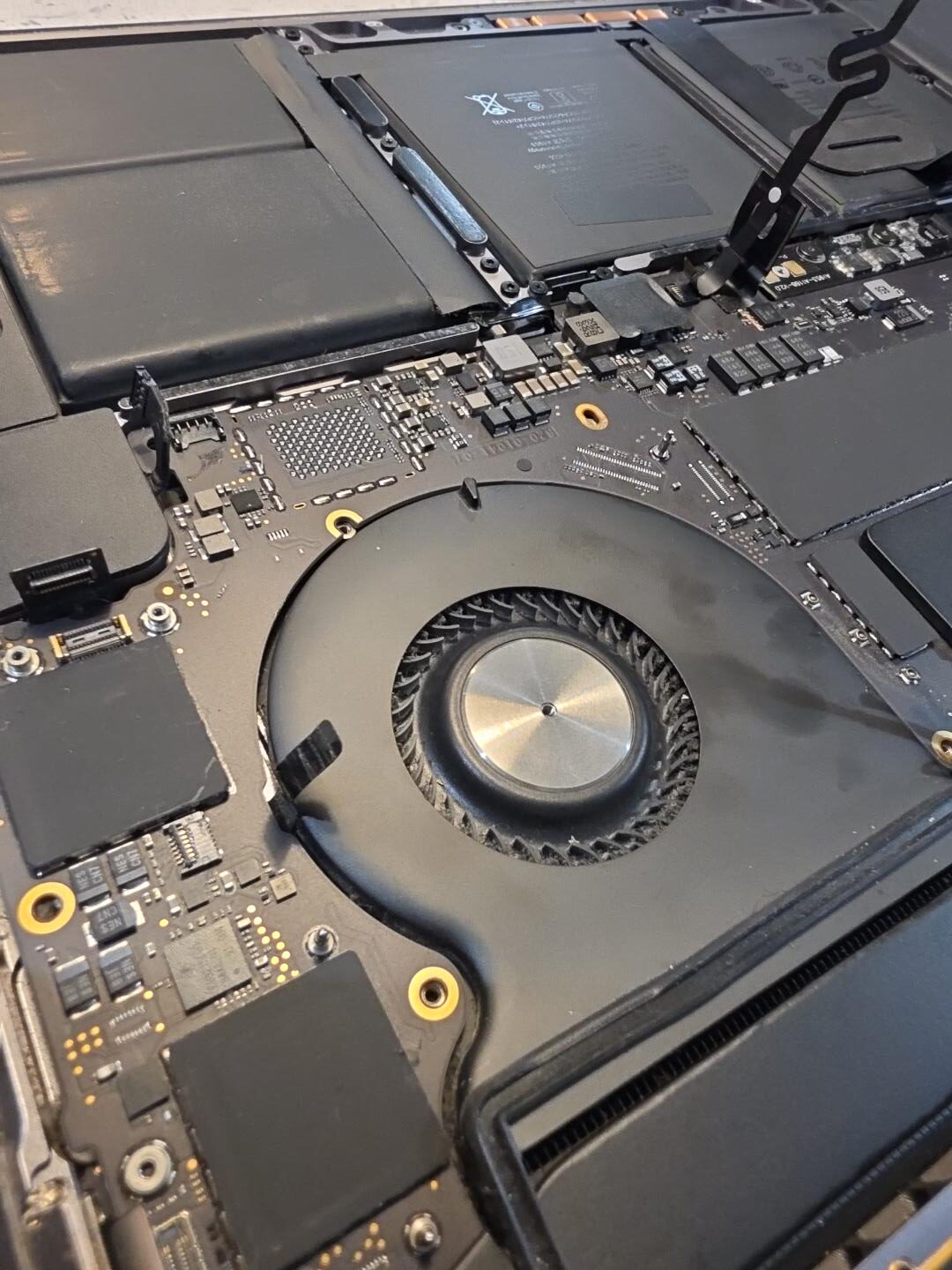
    Opened MacBook Pro A1990 during no-power diagnosis at iPhoneBits near Belfast
    The A1990 opened for inspection. Our separate USB-C meter test showed approximately 5V; the meter reading is not pictured here.

    Why should a MacBook pull 20V?

    USB-C charging starts at a basic 5V supply. With a suitable charger and cable, the MacBook and charger communicate so the supply can increase to the higher voltage needed for normal charging. For this A1990, we expected negotiation to reach 20V.

    5V is a diagnostic clue, not a NAND diagnosis. Charger, cable, USB-C and board faults can interrupt that process. Not every MacBook stuck at 5V has a NAND fault. We confirmed the cause on this particular machine through the tests below.

    Logic board removed for testing

    We removed logic board 820-01814-01 and began checking the main power rails. These are the paths that distribute power around the board. Measuring them helps us narrow down a no-power fault before deciding whether any components need attention.
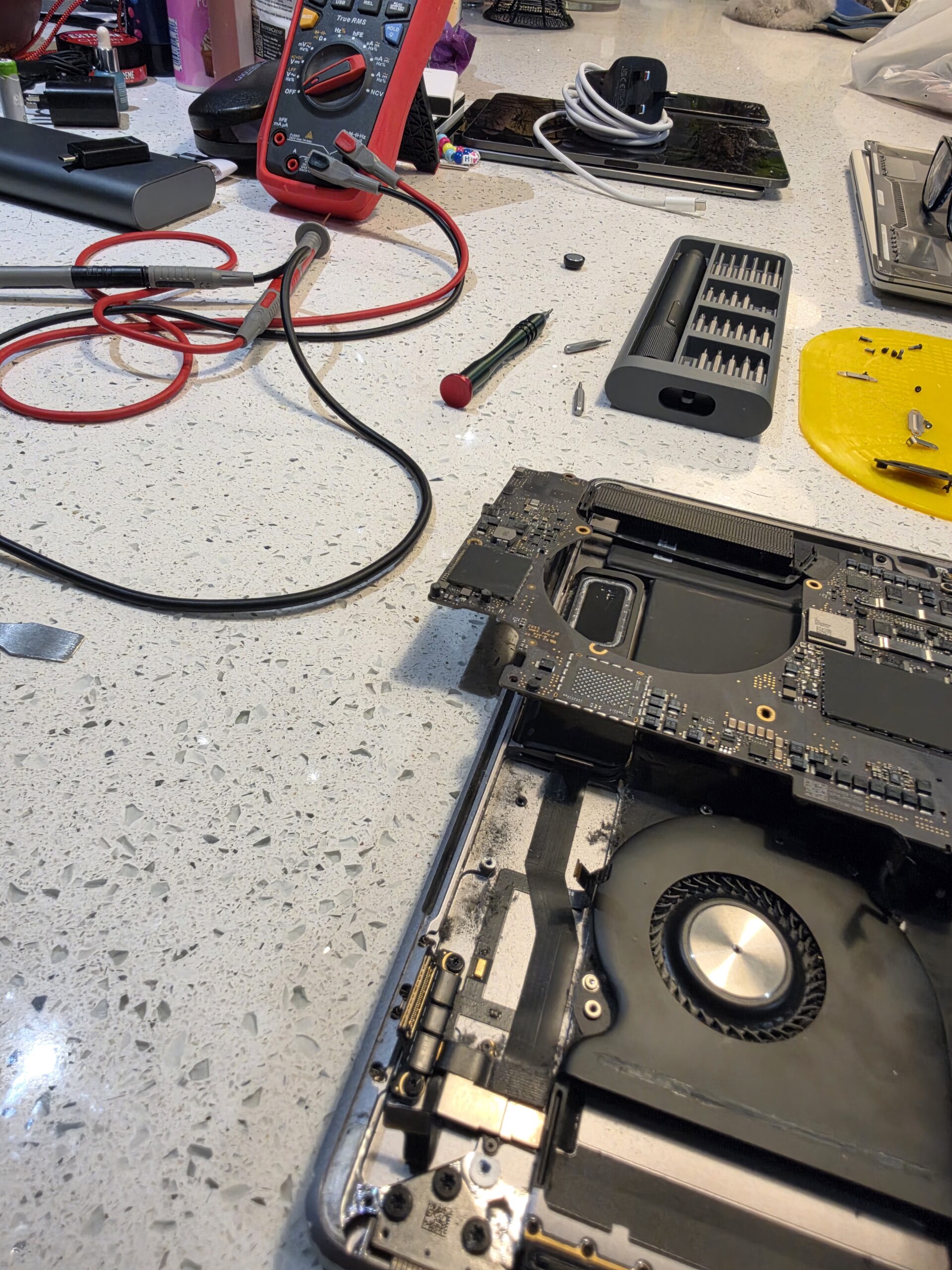
    MacBook A1990 logic board lifted from the chassis for board-level diagnosis at iPhoneBits
    Accessing the logic board on our workshop bench during the no-power investigation.

    Finding the short circuit

    Testing around F7000 and F7001 revealed a dead short. A short can pull a power rail down and prevent a machine from starting, but finding a shorted rail is only part of the job. We still needed to establish where that short originated.

    Several components share electrical connections. A short-circuit reading at one capacitor can therefore reflect a fault elsewhere on the same rail. It does not automatically mean that capacitor has failed.
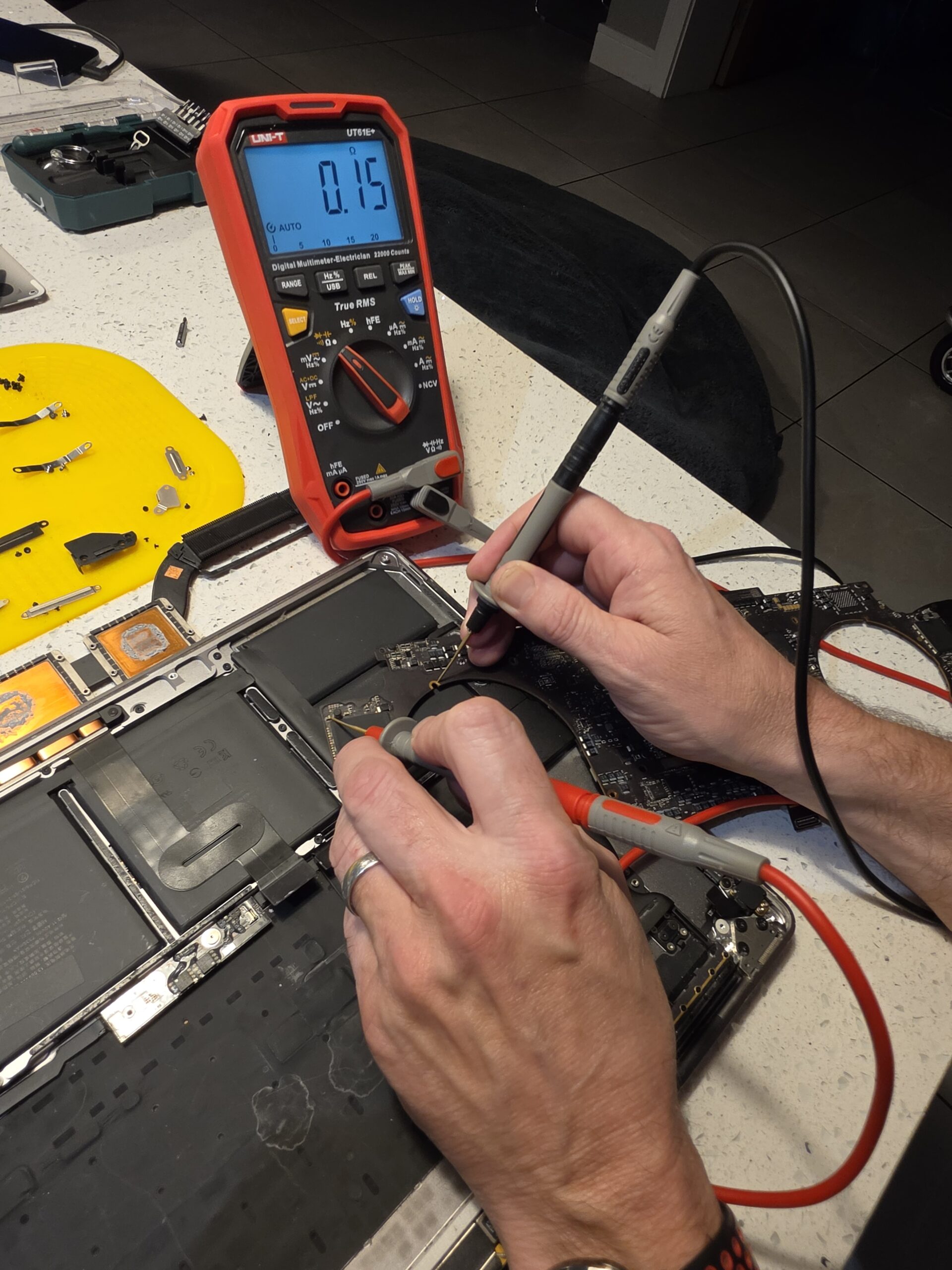
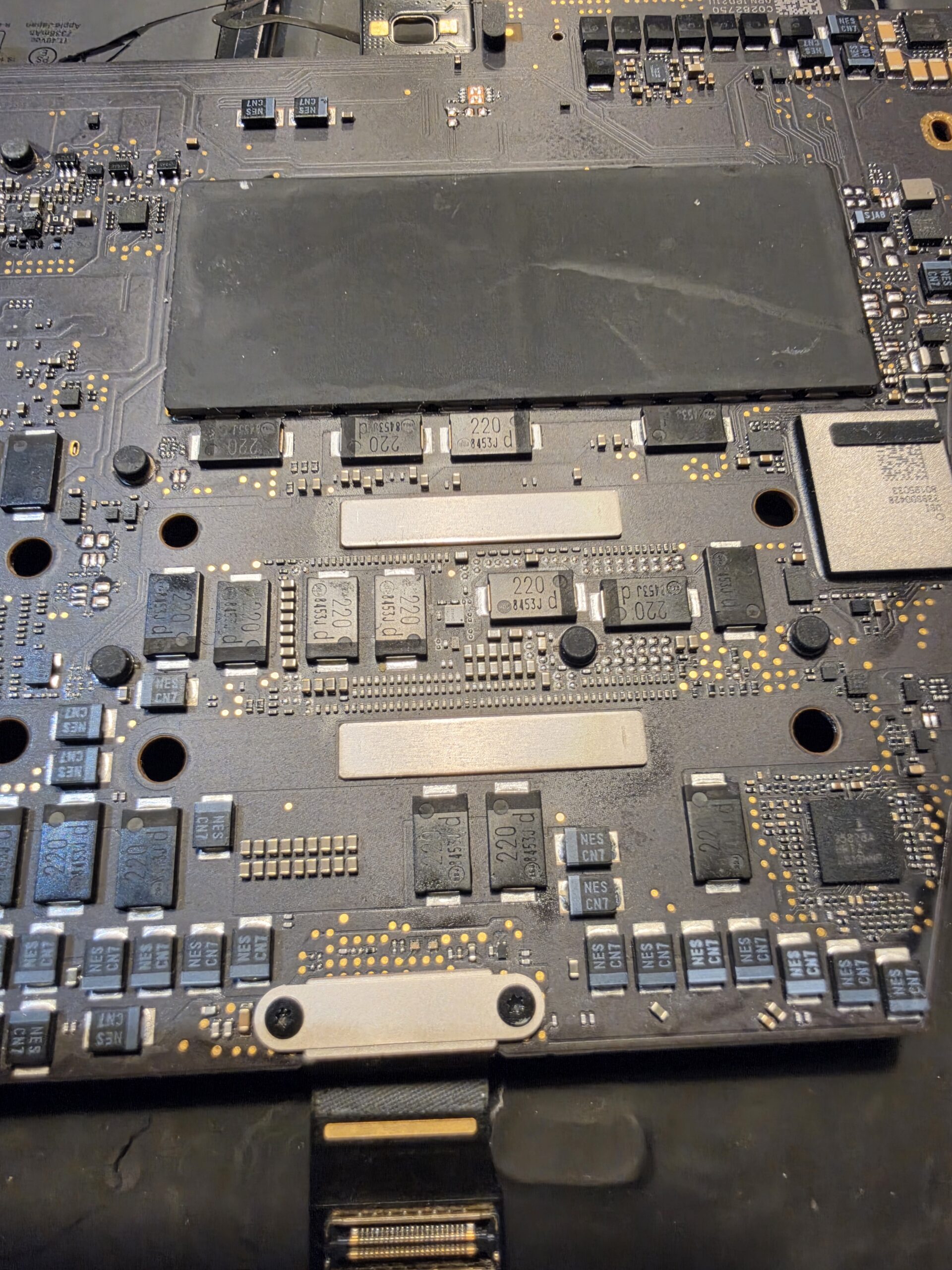
    Controlled voltage injection to locate the fault

    We used controlled voltage injection at approximately 1V on the affected rail, while monitoring the board for components heating. With the voltage and current carefully controlled for the circuit under test, this workshop technique helps locate where energy is being dissipated.

    Our measurements led us to C9081, C9074, C9574 and C9573. These capacitors were showing short-circuit readings, so they became part of the next stage of testing.
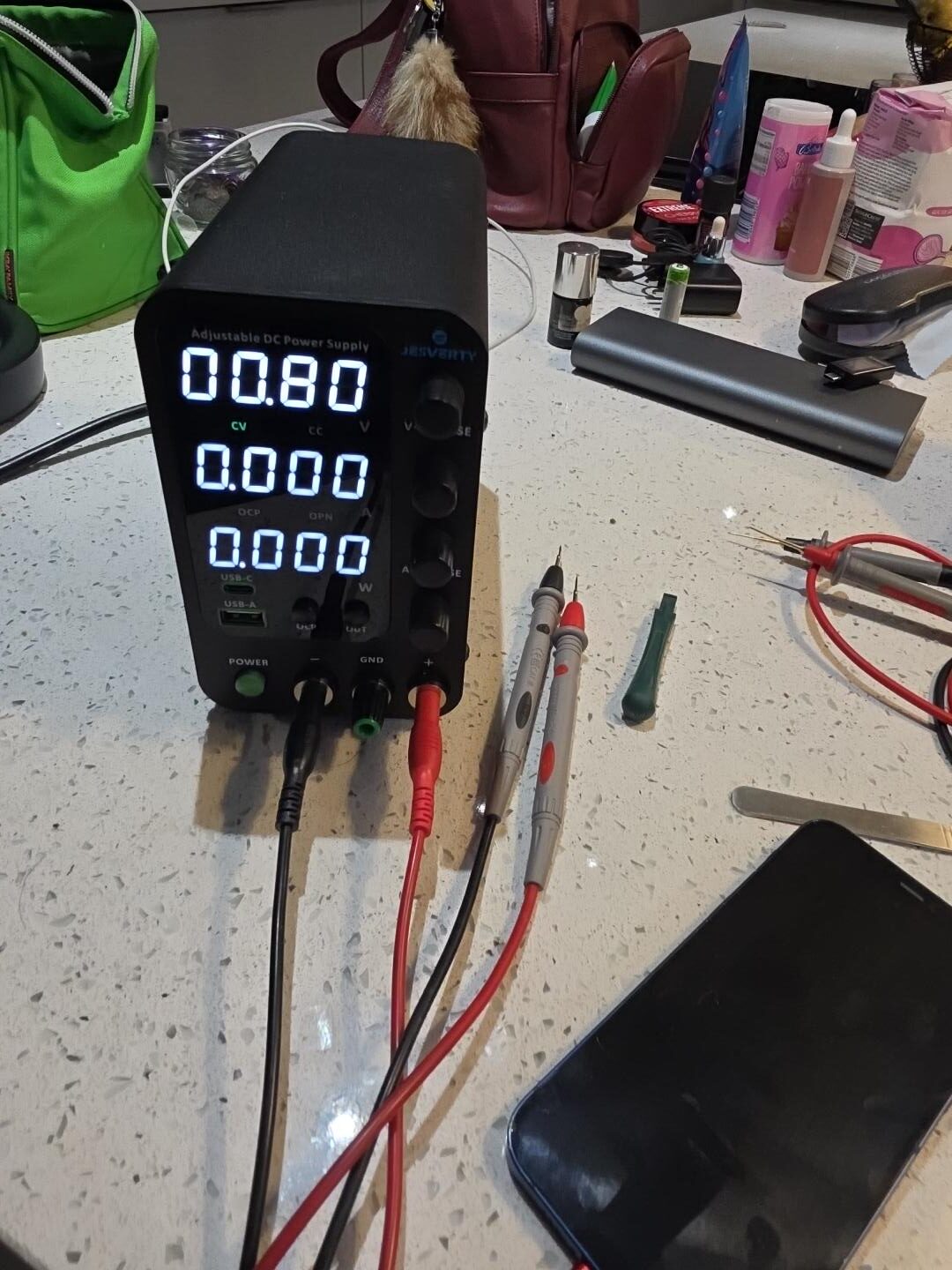
    Bench power supply used for controlled low-voltage injection during MacBook short-circuit diagnosis
    Our bench supply used for controlled low-voltage testing. This photograph shows a 0.80V setting; the diagnostic work used approximately 1V.

    Removing and testing the suspect components

    We began removing the suspect capacitors individually and checking the rail again. The short remained. Removing them did not clear the underlying fault, so fitting replacement capacitors alone would not have fixed this MacBook.

    We then removed and isolate-tested around F7000 and F7001 to determine which side of the circuit the short was coming from. That extra step separated a reading seen at nearby components from the actual source of the failure.
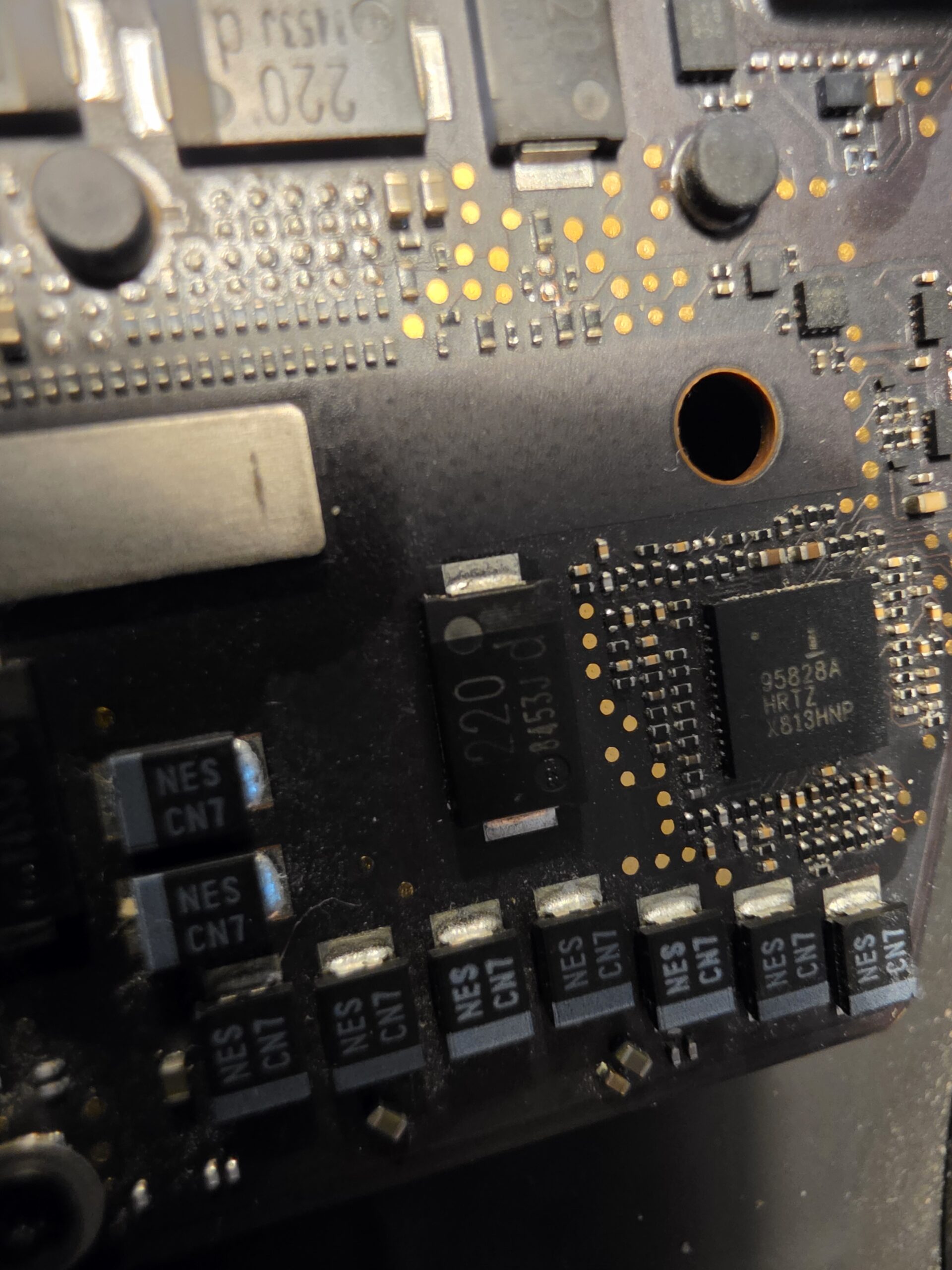
    Close-up of MacBook logic board components during short-circuit diagnosis in Glengormley
    Close-up component inspection formed part of tracing the short through the affected circuitry.

    The actual fault: NAND/storage circuitry

    Further board-level diagnosis showed that the short was associated with the NAND/storage circuitry, rather than simply one of the surrounding capacitors. NAND is the flash memory used to store the MacBook’s files and operating system.

    On this board, the storage components are soldered directly to the logic board. This was therefore a much more involved fault than swapping a removable drive or replacing a nearby capacitor.

    Why we declared this board BER

    BER means Beyond Economical Repair. It describes the financial sense of repairing this particular board, rather than claiming that NAND work is technically impossible.

    NAND repair or replacement can be possible in specialist circumstances. However, it involves precision work on soldered storage components and can require programming or configuration work. The labour, specialist equipment and complexity all affect the cost.

    For an older A1990, that work would normally be uneconomical compared with the value of the machine or the cost of a suitable replacement logic board or MacBook. In this case, we declared the original board BER and explained why further repair spending did not make sense.

    Repairability and value are different questions. A technically possible repair is not always the right recommendation for the customer.

    Proper diagnostics save customers money

    Replacing random parts would not have repaired this machine. The capacitors initially showed short readings, but the short persisted after removal. Proper diagnosis let us identify the real failure before unnecessary replacement parts were fitted.

    We would rather spend time finding the fault and explain when a repair is uneconomical than keep replacing components and run up a bill. That is how our family-run business approaches MacBook board repair: clear testing, clear explanations and a sensible recommendation.

    Our No Fix No Fee approach applies to eligible repairs, with assessment fees explained separately. The current prices page lists a £30 board diagnostic fee, deducted from the final repair total if you proceed, and a £30 non-refundable liquid-damage assessment fee. We explain applicable fees before assessment and quote further work before it begins.

    Belfast computer repair & MacBook repairs

    Looking for MacBook repair in Belfast or computer repair in Newtownabbey? Our workshop is in Glengormley, and we welcome customers from Belfast, Carrickfergus, Ballyclare, Antrim and Larne.

    Our laptop and MacBook repair service covers Apple MacBooks and Windows laptops, including charging faults, liquid damage and dead or no-power machines. When a fault needs deeper investigation, we provide board-level diagnostics and microsoldering.

    If you need MacBook logic board repair near Belfast, we can assess the machine and explain whether component-level work is worthwhile. Different faults lead to different outcomes: our MacBook Pro A2338 charging repair was resolved with a charging port assembly after liquid-damage assessment.

    MacBook logic board repair: frequently asked questions

    Why is my MacBook only taking 5V?

    It may not be completing USB-C power negotiation. The charger, cable, ports or board circuitry may be involved. A 5V reading alone cannot identify the failed component or confirm a NAND fault.

    Can a shorted MacBook logic board be repaired?

    Often, depending on what has failed and the condition of the board. Some shorts can be resolved at component level; others involve specialist work that may exceed the machine’s value. Testing comes first.

    What does BER mean in computer repair?

    Beyond Economical Repair. It means the likely cost and work involved make repair poor value for that device, even if a specialist technical repair might be possible.

    Do iPhoneBits repair MacBook logic boards in Belfast?

    Yes. Our Glengormley workshop serves Belfast and Newtownabbey with MacBook board-level diagnosis and suitable component repairs, including power and charging faults. We explain when a board is not economical to repair.

    Is it worth repairing an older MacBook logic board?

    It depends on the fault, repair cost and condition of the MacBook. We compare the proposed work with sensible replacement options before recommending a repair. This A1990’s NAND-related fault made its original board BER.

    Local advice · Proper diagnosis

    MacBook or laptop completely dead?

    Don’t assume it needs replacing. Bring it to iPhoneBits for proper diagnosis. For Belfast computer repair, our family-run team will explain what has failed, what the options cost and whether the work makes sense.

    MacBook repair · Windows laptop repair · Board-level diagnostics · Microsoldering · Charging faults · Liquid damage · Dead/no-power machines

    iPhoneBits
    350 Antrim Road
    Glengormley, Newtownabbey
    BT36 5EQ
    Contact our workshopCall 07731 446515
  • Slow Laptop or PC? Windows Reinstalls & SSD Upgrades in Newtownabbey

    Slow Laptop or PC? Windows Reinstalls & SSD Upgrades in Newtownabbey

    Waiting ages for your laptop to start? Programs taking too long to open, or Windows freezing when you need it? A slow computer does not always need replacing. Sometimes it needs a proper clean-up, a fresh Windows installation or an upgrade from an old hard drive to an SSD.

    At iPhoneBits in Glengormley, we help customers across Newtownabbey, Belfast and the surrounding areas get their laptops and PCs working properly again. We are a local family-run repair business, with Windows installations, upgrades and suitable repairs carried out professionally in-house.

    WINDOWS • SSD UPGRADES • LOCAL WORKSHOP

    We can assess a slow laptop or PC, remove unwanted software and malware, reinstall Windows, fit a compatible SSD or prepare a computer for its next owner. We explain which option suits the machine before going ahead.

    Why has my laptop or PC become so slow?

    A computer can gradually become harder to use after years of accumulated programs, background tasks and unwanted software. Malware, damaged Windows files and a struggling mechanical hard drive can cause similar symptoms.

    • Long waits at startup or after signing in.
    • Programs freezing, crashing or taking ages to load.
    • Pop-ups, browser redirects or software you do not recognise.
    • Windows errors, failed updates or repeated startup problems.
    • An older laptop that still uses a mechanical hard drive.

    Slow laptop repair starts with finding the cause. A fresh installation can sort out many software problems, but it will not repair a failing drive, overheating or another hardware fault. Our Laptop / MacBook Repair service covers diagnosis as well as repairs and upgrades.

    Fresh Windows installations and reinstalls in Newtownabbey

    If Windows has become corrupted, unstable or cluttered, starting again can be the most practical option. With your agreement and a plan for any files you need to keep, we can wipe the machine and install a fresh, fully activated copy of Windows using a valid licence.

    What does a proper Windows reinstall include?

    • Checking the computer, Windows compatibility and licensing.
    • Agreeing what needs backed up or transferred before any wipe.
    • Removing the old Windows installation, unwanted files and software from the agreed drive.
    • Installing the appropriate edition of Windows and checking activation.
    • Installing all available applicable Windows updates and the correct drivers for the hardware.
    • Checking everyday functions such as Wi-Fi, sound and startup before handover.

    The aim is to leave your computer clean, updated and ready to use, with any agreed file restoration or extra software discussed beforehand.

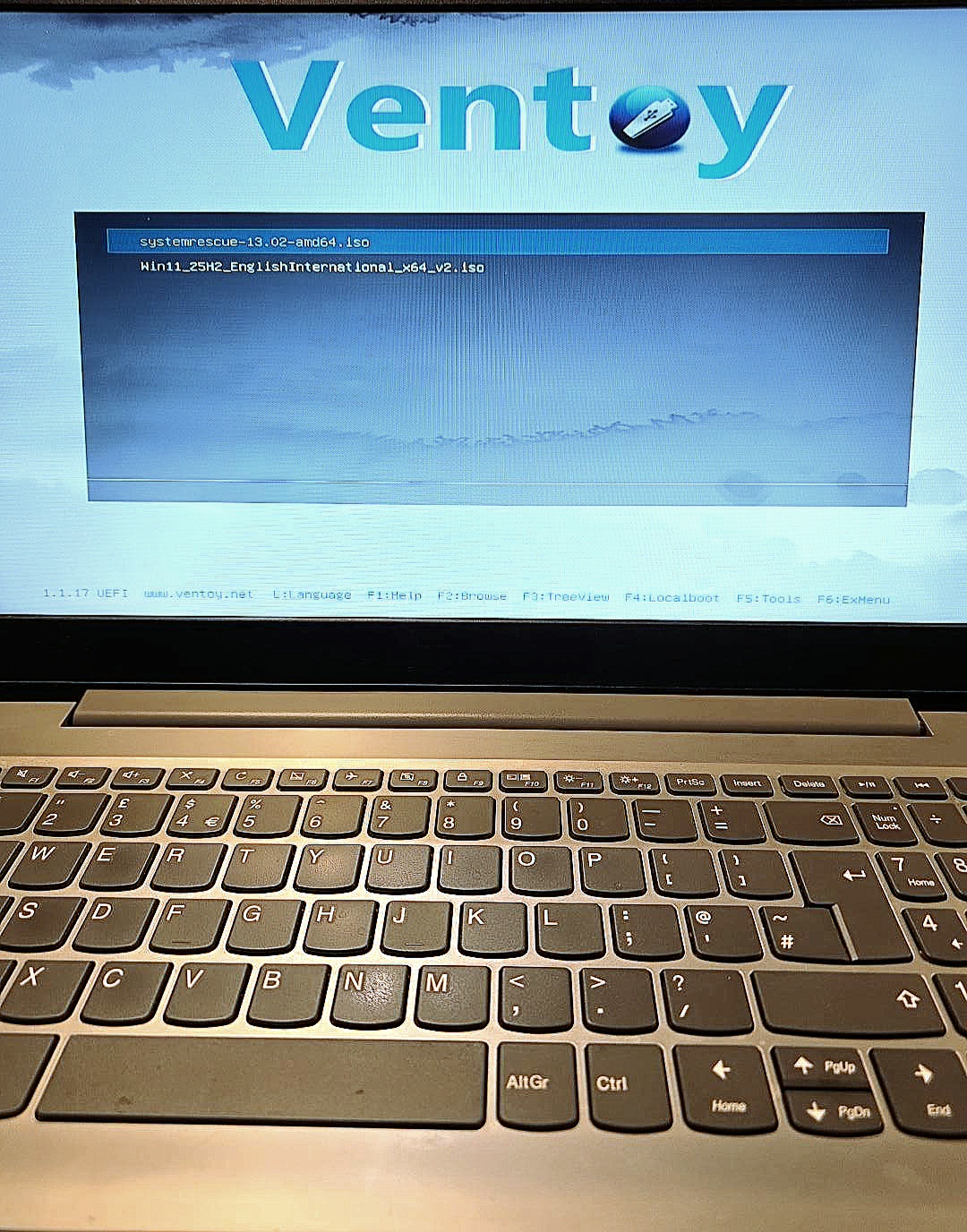
    Laptop on the iPhoneBits bench displaying the installation media boot menu
    Preparing a laptop to start from installation media in the workshop.

    Windows 11 installation and Windows upgrades

    If you need Windows 11 installation in Newtownabbey or a Windows upgrade in Glengormley, bring the laptop or PC in and we can check whether it is suitable. Windows 11 has hardware requirements, so not every older computer can be upgraded to a supported installation.

    Standard Windows 10 support ended on 14 October 2025. An SSD can make a computer faster, but it does not change its Windows 11 eligibility. We will explain the practical options for your machine. You can also read Microsoft’s Windows 11 requirements and upgrade guidance.

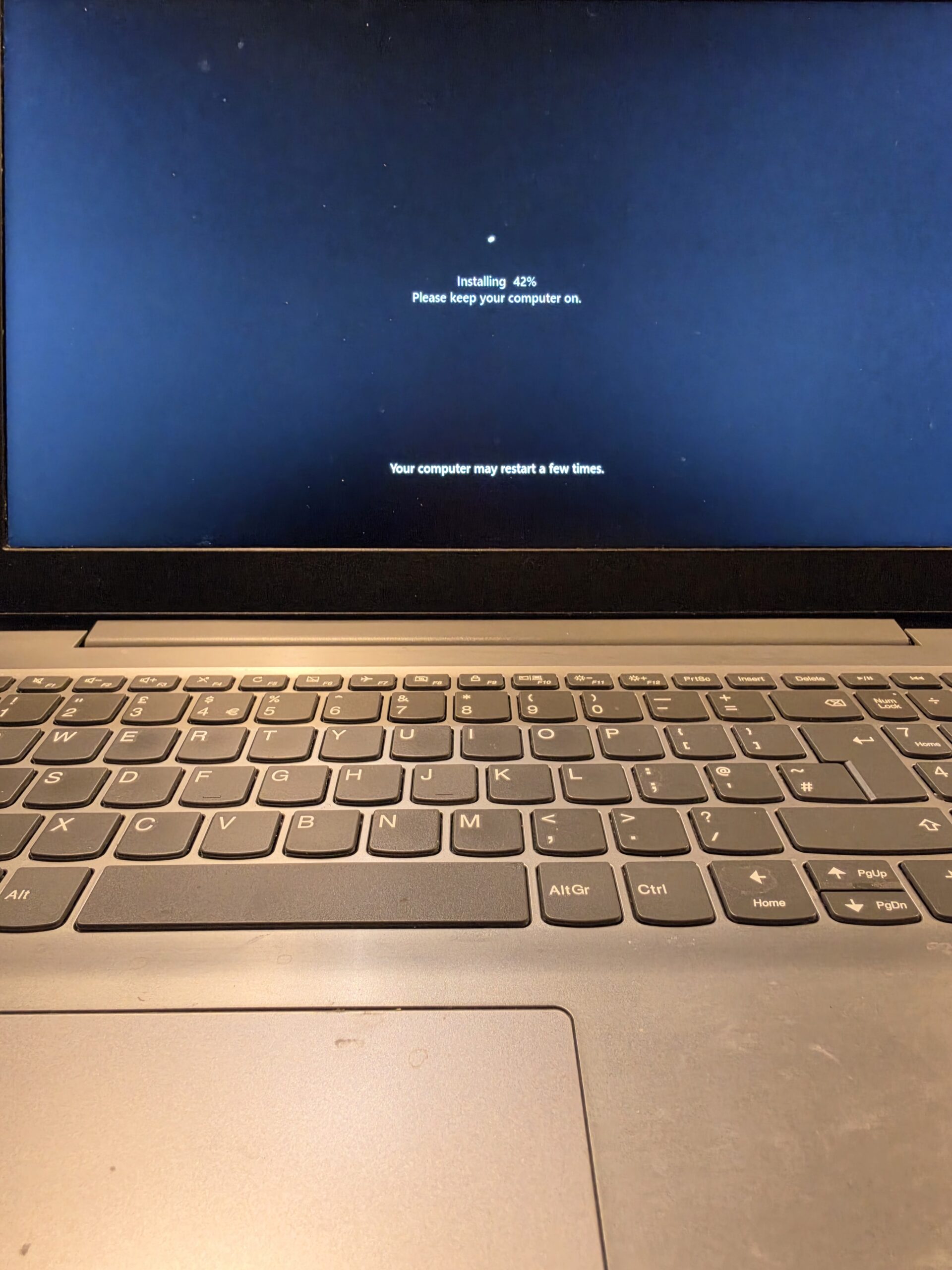
    Windows installation progressing on a laptop in the workshop
    A fresh Windows installation underway. Updates, drivers and checks follow as part of the setup.

    SSD upgrades: one of the best improvements for an older computer

    An old mechanical hard drive stores files on spinning discs. An SSD uses electronic storage with no moving parts, so the computer can read the information it needs much more quickly.

    Replacing a mechanical drive with a compatible SSD can dramatically improve startup times, program loading and general responsiveness. Everyday jobs such as opening a browser, checking email and switching between programs can feel much quicker.

    Can my laptop take an SSD?

    Many laptops and desktop PCs can, but the type of SSD and the installation options depend on the model. We check compatibility, the condition of the computer and how much storage you need before recommending a laptop SSD upgrade.

    For an SSD upgrade in Newtownabbey, we can discuss a fresh Windows installation or transferring an existing system where appropriate. If the old installation is damaged or full of unwanted software, a clean setup may be the better choice. An SSD will not fix every bottleneck, so we will also consider memory, processor capability and other faults.

    Keep the laptop you already know? If the screen, keyboard and rest of the machine are in good condition, an SSD upgrade may be worth considering before replacement. We can help you weigh up the cost, supported Windows options and what you use the computer for.

    Virus and malware removal in Glengormley and Newtownabbey

    A laptop that seems slow may be busy running unwanted programs or malware in the background. Browser extensions, advertising software and years of unnecessary startup programs can also get in the way.

    We offer virus and malware removal for local laptop and PC users, along with checks for damaged Windows files and unwanted software. Depending on what we find, a targeted clean-up may be enough, or we may recommend wiping and reinstalling Windows for a clean start.

    If you are looking for virus removal in Newtownabbey or Glengormley, tell us about any pop-ups, unexpected messages or changes you have noticed. If accounts may have been compromised, removing malware alone will not secure those accounts; we can explain the next steps.

    Preparing a laptop or PC for a new owner

    Selling a computer or passing a laptop to a family member? Simply deleting a few folders or removing desktop icons is not a proper handover.

    We can securely remove the previous owner’s files and accounts from the machine, reinstall Windows and set it up cleanly for the next person. We choose a suitable erasure method for the storage fitted and check which drives need clearing. A routine Windows reinstall is not, by itself, the same as secure data erasure.

    Before we begin, tell us what you want to keep and make sure important photos, documents and other files are backed up. We can discuss backup or transfer options first. The new owner can then use their own account rather than inheriting your files, saved sign-ins and old software.

    Laptop undergoing a Windows installation at iPhoneBits
    Windows being installed as part of a clean setup. For a new-owner handover, we also agree the required data erasure and account setup.

    Windows activation, updates and drivers

    We check that Windows is properly activated after reinstalling. Many machines with an existing legitimate digital Windows licence reactivate automatically when the same edition is reinstalled on the same device and connected to the internet.

    The edition matters: a Home licence does not automatically activate Pro. Hardware changes or a missing valid licence can require extra steps or a new licence, which we discuss before proceeding. Microsoft’s activation guidance explains how digital licences work.

    We also install all available applicable Windows updates and suitable drivers, rather than stopping as soon as the desktop appears. Drivers help Windows work correctly with the laptop’s Wi-Fi, graphics, sound and other hardware.

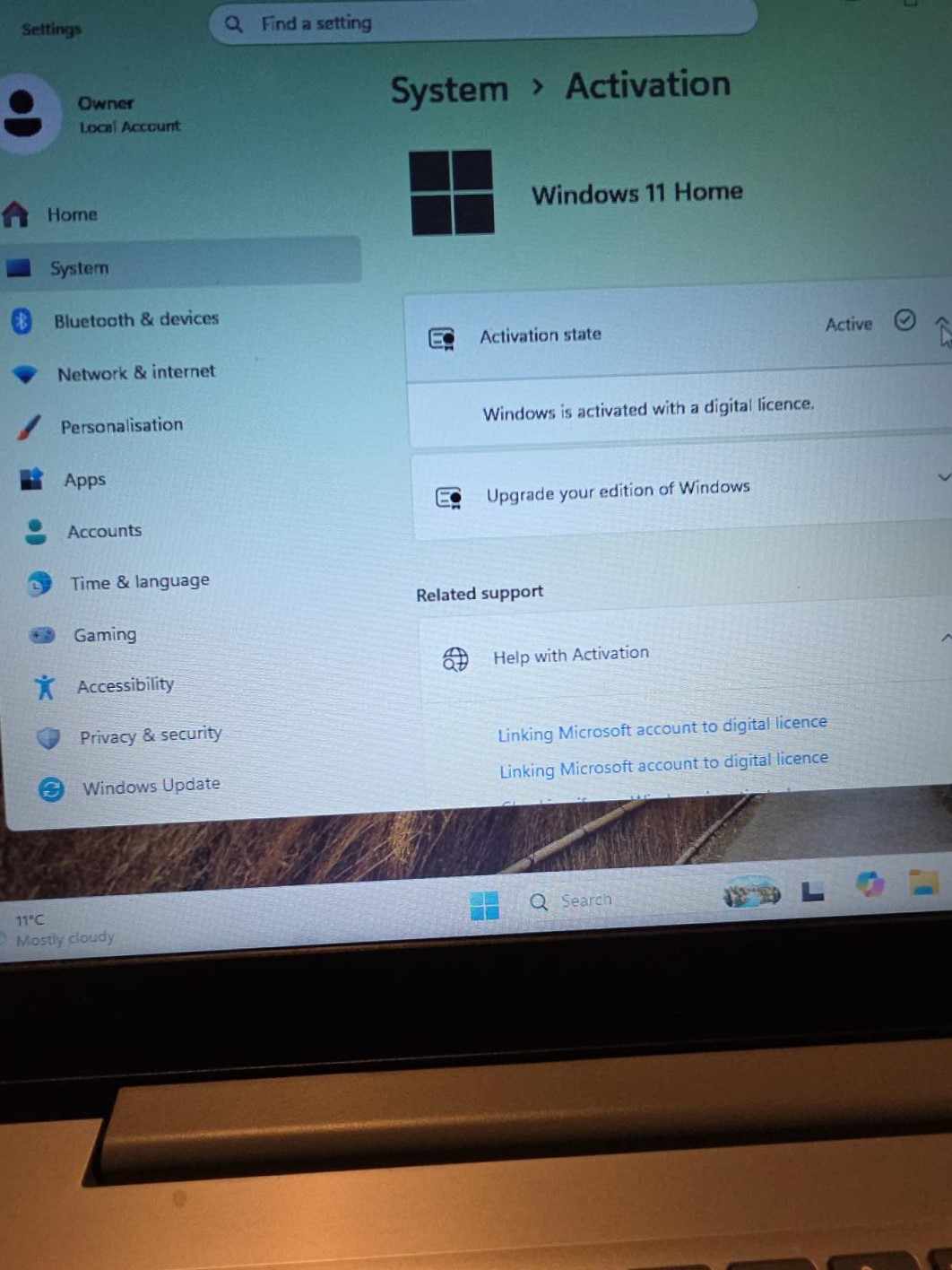
    Windows 11 Home activation screen showing an active digital licence
    Checking activation: this workshop photo shows Windows 11 Home activated with a digital licence.

    Frequently asked questions

    Will a fresh Windows install make my laptop faster?

    It can, especially if unwanted programs, malware or damaged Windows files are causing the slowdown. If the main problem is an old mechanical hard drive, an SSD upgrade may make a much bigger difference. We check the machine first.

    Will I lose my files?

    A wipe and clean installation removes files, apps and settings from the drive being erased. Tell us what you need to keep before work starts. Back up important files first, or ask us about an agreed backup or transfer. Paid software may need its own licence and reinstalling.

    Can you upgrade my laptop to an SSD?

    We can upgrade many laptops and desktop PCs to an SSD. We need to check your model, storage connection and capacity requirements first, as some machines have storage that cannot be replaced.

    Can you prepare a laptop for a new owner?

    Yes. We can agree the secure removal of the previous owner’s data and accounts, reinstall Windows and prepare a clean setup for the next person. Let us know that the machine is being sold or given away when you bring it in.

    Can you remove viruses and malware?

    Yes. We assess the problem and can remove malware and unwanted software. Where a clean-up is not the best option, we can discuss a fresh Windows installation and how to handle the files you need to keep.

    Will Windows be activated after reinstalling?

    We check activation as part of the service. An existing legitimate digital licence will often reactivate the same Windows edition automatically on the same machine. If a new licence is needed, we explain that first.

    Do you install Windows updates and drivers?

    Yes. We install all available applicable Windows updates and the correct available drivers during setup, then check the computer before handover. Windows will continue to receive further updates as Microsoft releases them while the installed version remains supported.

    Is it worth upgrading an older laptop instead of replacing it?

    Often, if it is otherwise in good condition and suitable for your needs. We consider the upgrade cost, hardware condition, performance and supported operating system options. We will tell you if spending more on it is unlikely to make sense.

    Local laptop and computer repair near Belfast

    Our Glengormley workshop welcomes customers looking for laptop repair and computer repair in Newtownabbey, as well as PC repair and laptop upgrades near Belfast. You can speak to us about the symptoms without needing to know whether the answer is a repair, Windows reinstall, SSD upgrade or a clean-up.

    See our Laptop / MacBook Repair page for wider repair options, or our Other Electronic Repairs page for other devices we work on. For a real example of hardware diagnosis, read about a dead PC repaired in our Newtownabbey workshop.

    Bring your slow laptop or PC into iPhoneBits

    Let our local family-run team take a look and explain the most sensible next step. We help customers from Glengormley, Newtownabbey, Belfast and surrounding areas with Windows reinstalls, SSD upgrades, malware removal and everyday computer repairs.

    iPhoneBits
    350 Antrim Road
    Glengormley
    BT36 5EQ

    Bring your laptop or PC in, or contact us first if you are unsure what it needs. Tell us about any files you want to keep before we start.

    Contact iPhoneBits about your computer
  • Dead PC Brought Back to Life – Computer Repair in Newtownabbey

    Dead PC Brought Back to Life – Computer Repair in Newtownabbey

    PC not turning on? A completely dead computer does not always mean a major component has failed. This desktop arrived at iPhoneBits with no power at all. After careful fault-finding, we traced the problem to a broken wire and brought it back to life.

    It is a good example of the computer repair work we carry out in Newtownabbey. Our family-run workshop in Glengormley repairs desktop PCs, gaming PCs, Windows laptops and Apple MacBooks, with proper diagnostics before we recommend parts.

    REAL REPAIR • REAL WORKSHOP • NEWTOWNABBEY

    Arrived: desktop computer completely dead and unable to power on
    Fault found: a broken wire, traced through systematic testing
    Work completed: wiring repair, customer-requested GPU upgrade and thorough internal clean
    Result: computer brought back to life, rebuilt and tested.

    A dead PC and a fault that took time to find

    The computer came into our workshop completely dead. We stripped it down and began checking the components and wiring systematically. The cause was not immediately obvious, and it took time to work through the possibilities.

    There was no reason to jump straight to replacing a motherboard, graphics card or power supply. First, we needed to establish what was actually stopping this machine from switching on.

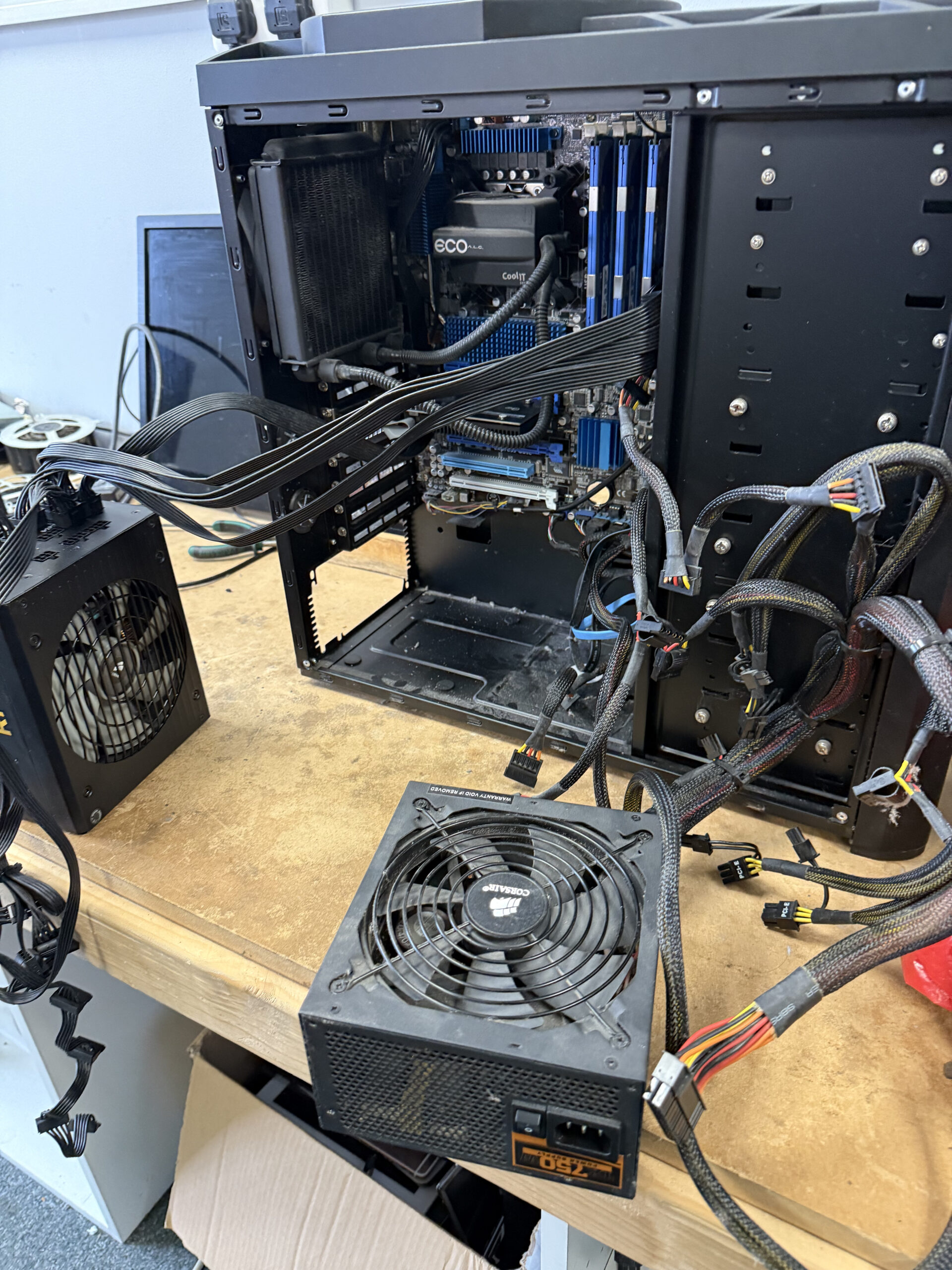
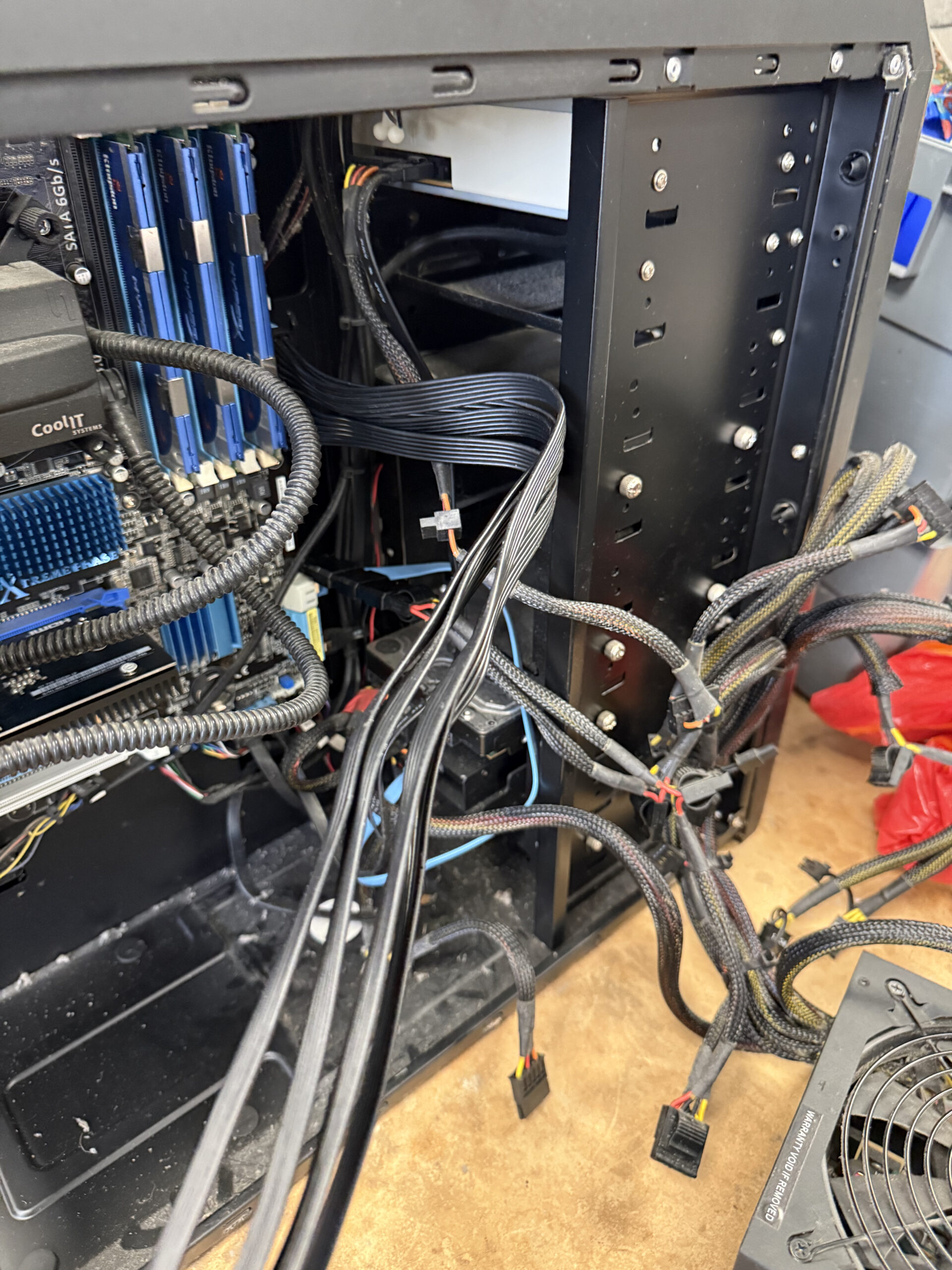
    Open desktop PC case with internal cables exposed during workshop diagnostics
    1 · Working through the fault: the desktop opened up on the bench, with its internal wiring accessible for inspection and testing.

    The broken wire behind the no-power fault

    Eventually, our testing led us to a broken wire. A relatively small wiring fault was enough to leave the entire computer looking completely dead.

    We repaired the wiring fault and restored power. That was the cause of this particular breakdown; it does not mean every PC or laptop that will not turn on has the same problem.

    This is why computer diagnostics matter. A symptom tells us where to start, but testing tells us what needs repairing. Replacing parts without confirming the fault can add cost and still leave the original problem unresolved.

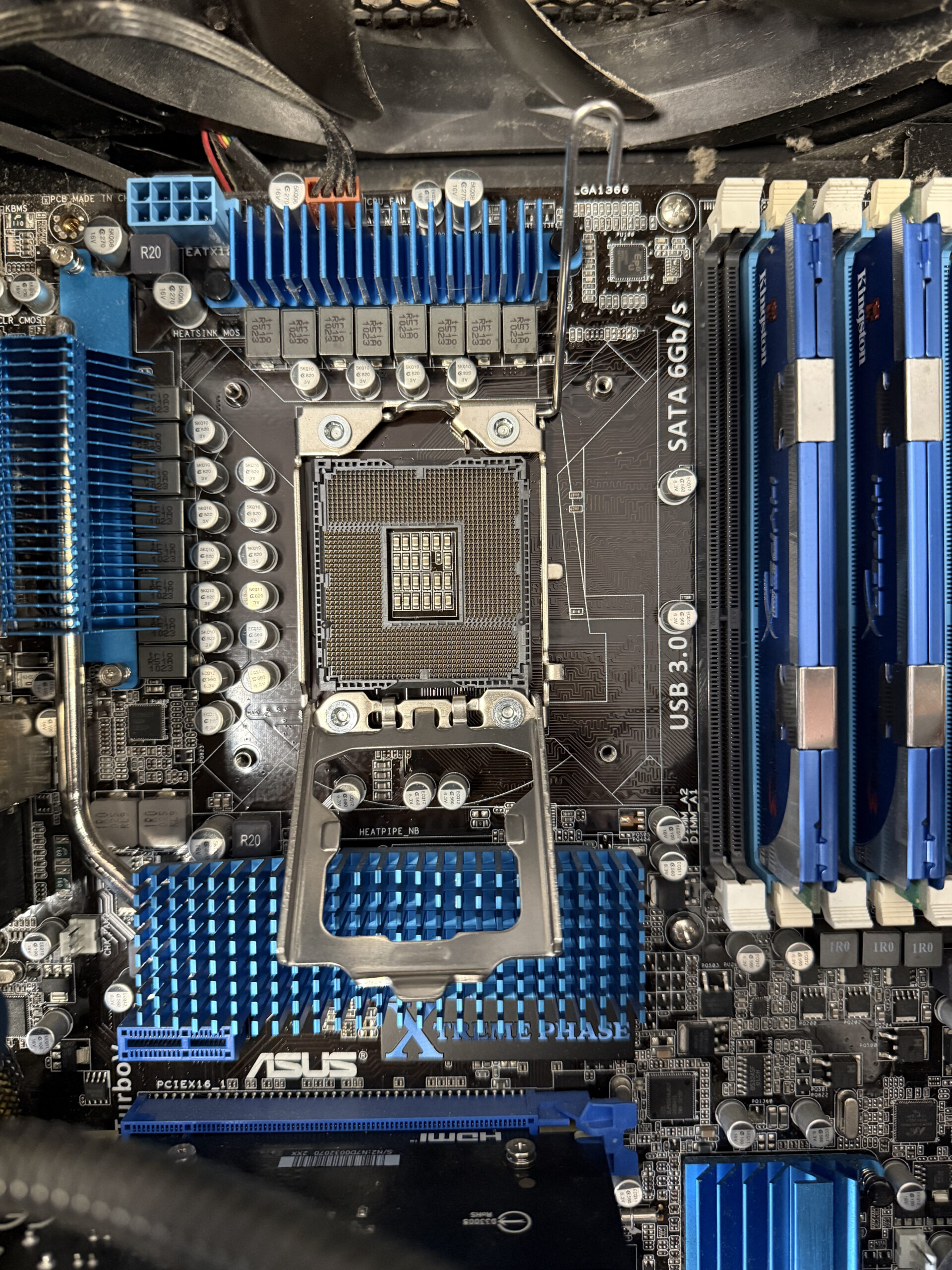
    Desktop motherboard with the CPU socket exposed, blue heatsinks and memory modules visible
    2 · During the strip-down: a close view of the motherboard and exposed CPU socket. This photograph records the inspection work; it does not identify the broken wire.

    A GPU upgrade and a thorough internal clean

    While the computer was with us, the customer also asked us to upgrade the GPU We carried out that upgrade and gave the inside of the tower a thorough clean before rebuilding and testing it.

    The graphics upgrade was additional work requested by the customer. The wiring repair was what brought the dead PC back to life.

    If you are considering PC upgrades, we can discuss what suits your machine and how you use it. SSD, RAM and GPU upgrades depend on the computer’s compatibility and condition, so we check what is practical before recommending a change.

    Computer or laptop suddenly stopped working?

    Tell us the model, the symptoms and anything that happened before the fault started. iPhoneBits can assess the problem and explain the repair options and likely costs.

    Ask for a computer repair quote

    Computer, laptop and MacBook repairs in Newtownabbey

    Despite the name, iPhoneBits repairs much more than phones. Our computer and laptop repair service covers everyday desktop PC repair, gaming PC repair, Windows laptops and Apple MacBooks.

    Customers bring us a wide range of faults and upgrade requests, including:

    • Power and charging: completely dead computers, laptops not turning on or not charging, broken charging ports and battery problems.
    • Screens and cooling: broken laptop screens, overheating, fan problems and internal cleaning.
    • Performance and upgrades: slow computers, SSD upgrades, RAM upgrades and compatible GPU upgrades.
    • Windows and software: startup problems, software faults, virus and malware problems.
    • Liquid damage and data: spill assessments, data transfers and recovery assessments where appropriate.
    • Motherboard faults: board-level diagnosis, component-level repairs and microsoldering where the fault requires them.

    Laptop and MacBook repair in Glengormley

    A laptop that will not charge or a MacBook that will not switch on needs diagnosis just as much as a desktop does. We assess the fault and discuss the available options for that model.

    For another genuine workshop example, read about our MacBook Pro charging repair after liquid damage. Different symptoms and different machines need their own checks; we do not assume the same repair will suit every device.

    When a fault needs board-level attention

    Some problems need more than a replaceable assembly. Our board-level repair and microsoldering service covers detailed assessment of damaged connectors, power circuitry and other component faults.

    This desktop case was resolved by repairing the wiring. The point is to follow the evidence and recommend the work the machine actually needs, whether that turns out to be a small wiring repair or more involved board work.

    Your local computer repair workshop in Glengormley

    If you need PC repair in Newtownabbey, laptop repair in Glengormley or MacBook repair near Belfast, you can speak directly to our local team. We welcome customers from Belfast and the surrounding areas and give honest advice about whether a repair or upgrade makes sense.

    Find us at iPhoneBits, 350 Antrim Road, Glengormley, Newtownabbey, BT36 5EQ. Our workshop is upstairs. Contact us before travelling if you would like to discuss the fault or check the next step.

    This computer left the bench working again, with its wiring repaired, GPU upgraded and interior cleaned. Finding the small fault took time, but it meant we could repair the actual problem rather than replace parts at random.

    Let us take a look at your computer

    For computer, laptop or MacBook repairs in Newtownabbey, Glengormley, Belfast and surrounding areas, contact iPhoneBits for an assessment or repair quote. Tell us what has gone wrong, and we will give you clear, practical advice.

    Contact iPhoneBits about your repair
  • MacBook Pro A2338 Not Charging After Liquid Damage – Same-Day Repair

    This MacBook Pro A2338 still worked, but it would not charge after a juice spill. It came into our iPhoneBits workshop in Glengormley today, and we were able to get it charging and working correctly again the same day.

    The repair involved a liquid-damage assessment and clean-down, followed by replacement of the charging port assembly. The correct part was already in stock. Our three workshop photographs below show the opened MacBook, the port assembly during the repair and the final power-status screen.

    REAL REPAIR AT iPHONEBITS

    Model: MacBook Pro A2338
    Reported fault: working, but not charging after a juice spill
    Work completed: £30 liquid-damage assessment/clean-down, then charging port assembly replacement
    Result: charging restored the same day. A separate battery service warning was also noted.

    A working MacBook that would not charge

    The customer told us juice had been spilled on the MacBook. Although it still switched on and worked, it was no longer charging. Before starting, we explained that liquid-damaged devices require a £30 assessment and clean-down before further repair work is carried out. The customer agreed, so we proceeded.

    After opening the MacBook, we cleaned and inspected the affected areas. That inspection showed that the charging ports needed to be replaced.

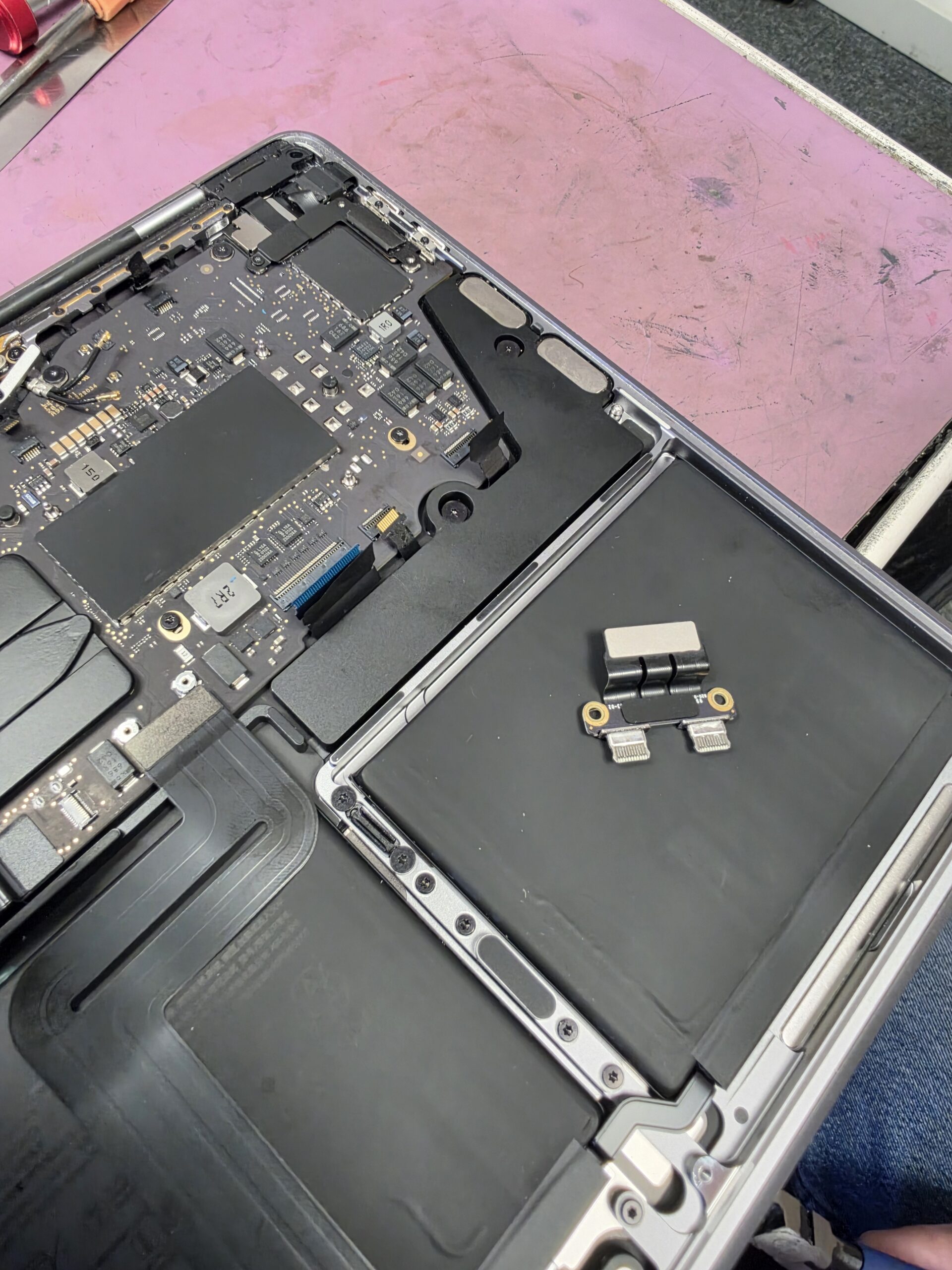
    MacBook Pro A2338 opened for liquid damage inspection at iPhoneBits Glengormley
    1 · Inspection: the A2338 opened on our workshop bench during the liquid-damage assessment.

    Charging port replacement, completed the same day

    We had the correct charging port assembly in stock. We replaced it and got the MacBook charging and working correctly again, without having to wait for a part to arrive.

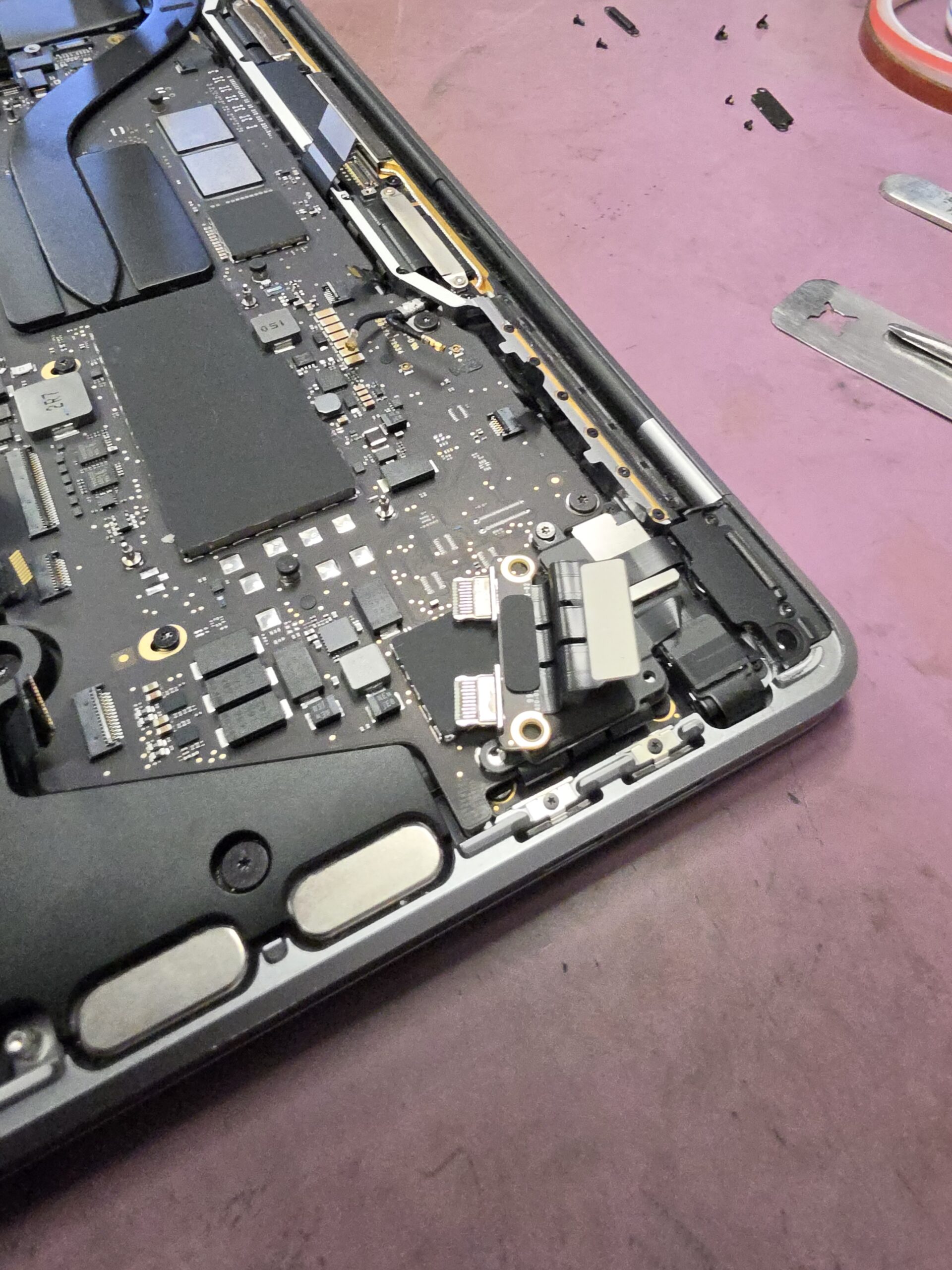
    MacBook Pro A2338 USB-C charging port assembly during replacement at iPhoneBits
    2 · Port repair: the USB-C charging port assembly during the replacement work.

    Many repairs can be completed the same day when the required parts are in stock, as happened with this A2338. Timing still depends on the fault, the extent of any liquid damage and the parts needed. We explain the likely turnaround after assessment.

    The battery warning is a separate issue

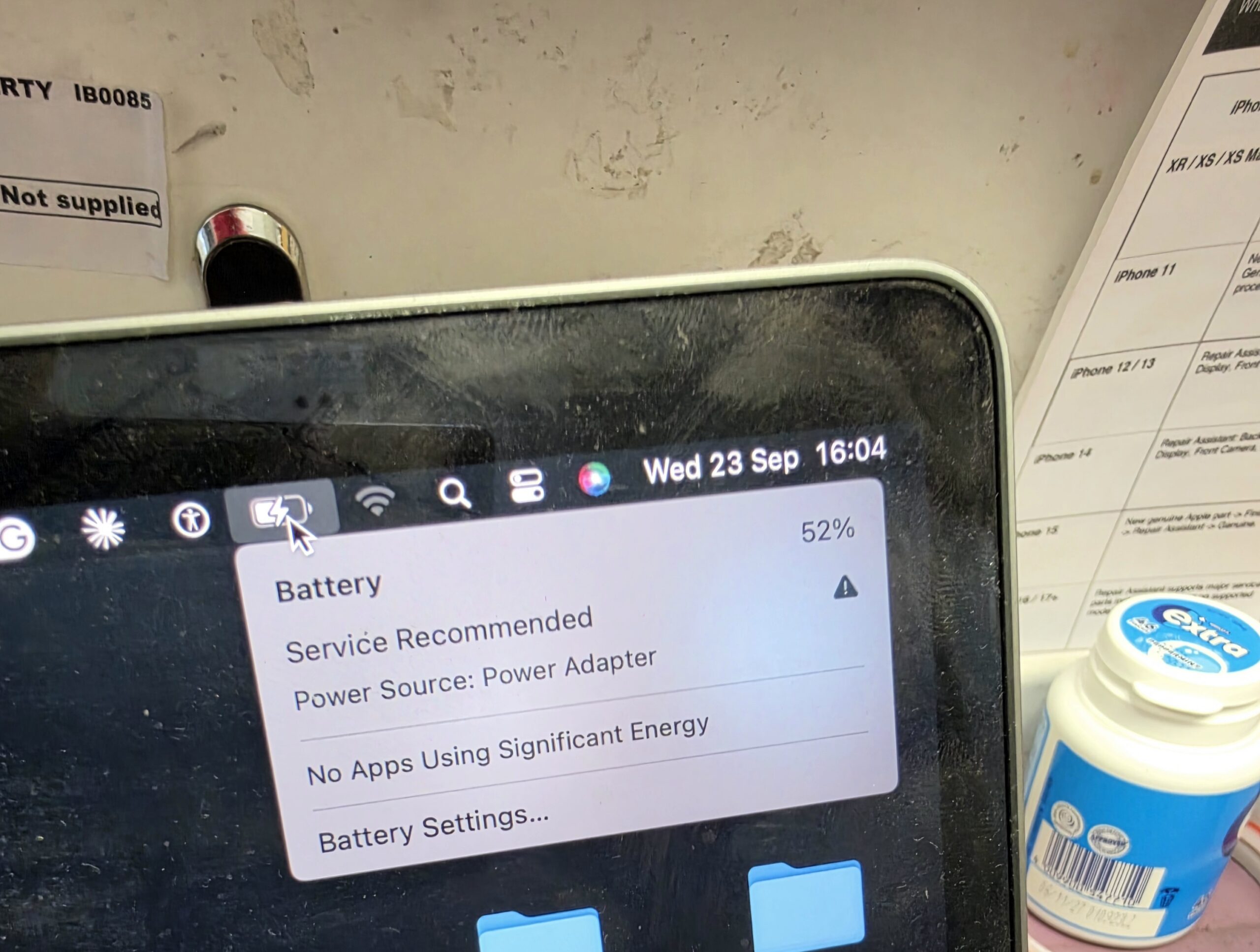
    The final photograph shows macOS reporting “Service Recommended” for the battery. It also shows “Power Source: Power Adapter”. The charging fault had been resolved by replacing the charging port assembly; the battery warning is a separate condition and was not the cause of this repair.

    MacBook Pro battery menu showing Service Recommended and Power Source: Power Adapter after charging port repair
    3 · After the charging repair: the Mac recognises its power adapter. The separate battery “Service Recommended” warning remains visible.

    We will advise the customer that the battery is approaching replacement condition and provide a MacBook battery replacement quote. As they have already paid for this repair, we will offer them a good discount if they decide to have the battery replaced as well.

    What does “Service Recommended” mean?

    Apple explains that this warning means the battery holds less charge than when it was new, or is not functioning normally. It is a reason to have the battery assessed, rather than proof of a faulty charging port. You can read Apple’s explanation of the battery service warning.

    What liquid can do inside a MacBook

    A spill can reach charging ports, internal connectors, components and logic-board circuitry. Juice can also leave residue behind after the visible moisture has dried. The damage depends on where the liquid travels and what it reaches.

    Why can it still work but stop charging?

    A MacBook can continue running on its remaining battery charge while a fault prevents power reaching it correctly through the charging connection. Damage does not have to affect every part of the computer at once. In this case, inspection led us to the charging ports, and replacing their assembly restored charging.

    Why early inspection matters

    Switching on successfully does not mean a liquid-damaged MacBook is clear of problems. Moisture and contamination can remain inside, and corrosion may develop around connections and components. Early professional cleaning can remove residue and reduce the chance of corrosion spreading, although it cannot guarantee that all damage is reversible.

    If you have just spilled liquid on your MacBook, shut it down, disconnect the charger and arrange an inspection promptly. Avoid repeated charging or restart attempts to see whether it has recovered.

    USB-C faults and board-level MacBook repairs

    Damaged USB-C ports can cause charging or connection problems. A MacBook that will not charge may also need checks of its charger, cable, internal connections and power circuitry. We diagnose the fault before recommending parts.

    Some liquid damage reaches the logic board and needs component-level work. iPhoneBits carries out board-level repair and microsoldering, including assessment of charging circuits, damaged connectors and no-power faults. Not every liquid-damaged MacBook needs board repair. This job was resolved with cleaning and charging port assembly replacement.

    MacBook repair in Glengormley, serving Belfast

    Our family-run workshop helps customers looking for MacBook Pro repair in Belfast and the surrounding area, as well as Apple MacBook repairs in Northern Ireland. See our laptop and MacBook repair service for charging faults, battery problems, liquid damage and other computer repairs.

    We offer No Fix No Fee on eligible repairs, but liquid-damage assessment and clean-down costs £30. That assessment fee is payable for the work carried out even if the device cannot be repaired. We explain further repair costs before proceeding.

    MacBook not charging or affected by a spill?

    Contact iPhoneBits if your MacBook has damaged USB-C ports, a battery warning, will not switch on, or needs logic-board or microsoldering work. Tell us the model, what happened and what it is doing now so we can advise on assessment.

    Visit our upstairs workshop at iPhoneBits, 350 Antrim Road, Glengormley, BT36 5EQ. Liquid-damage assessment/clean-down is £30, with any further work explained separately.

    Contact us about your MacBook repair
  • MacBook Air A2337 Liquid Damage Repair in Glengormley

    MacBook Air A2337 Liquid Damage Repair in Glengormley

    A pet accident, a keyboard that stopped working and a failed trackpad—with important coursework on the laptop. This MacBook Air A2337 came into iPhoneBits in Glengormley for liquid-damage repair.

    The customer told us that their dog had urinated on the MacBook. After the accident, the keyboard and trackpad no longer worked properly. They also explained that the files on it were very important for their coursework, so getting the computer working again mattered.

    What we found inside the MacBook

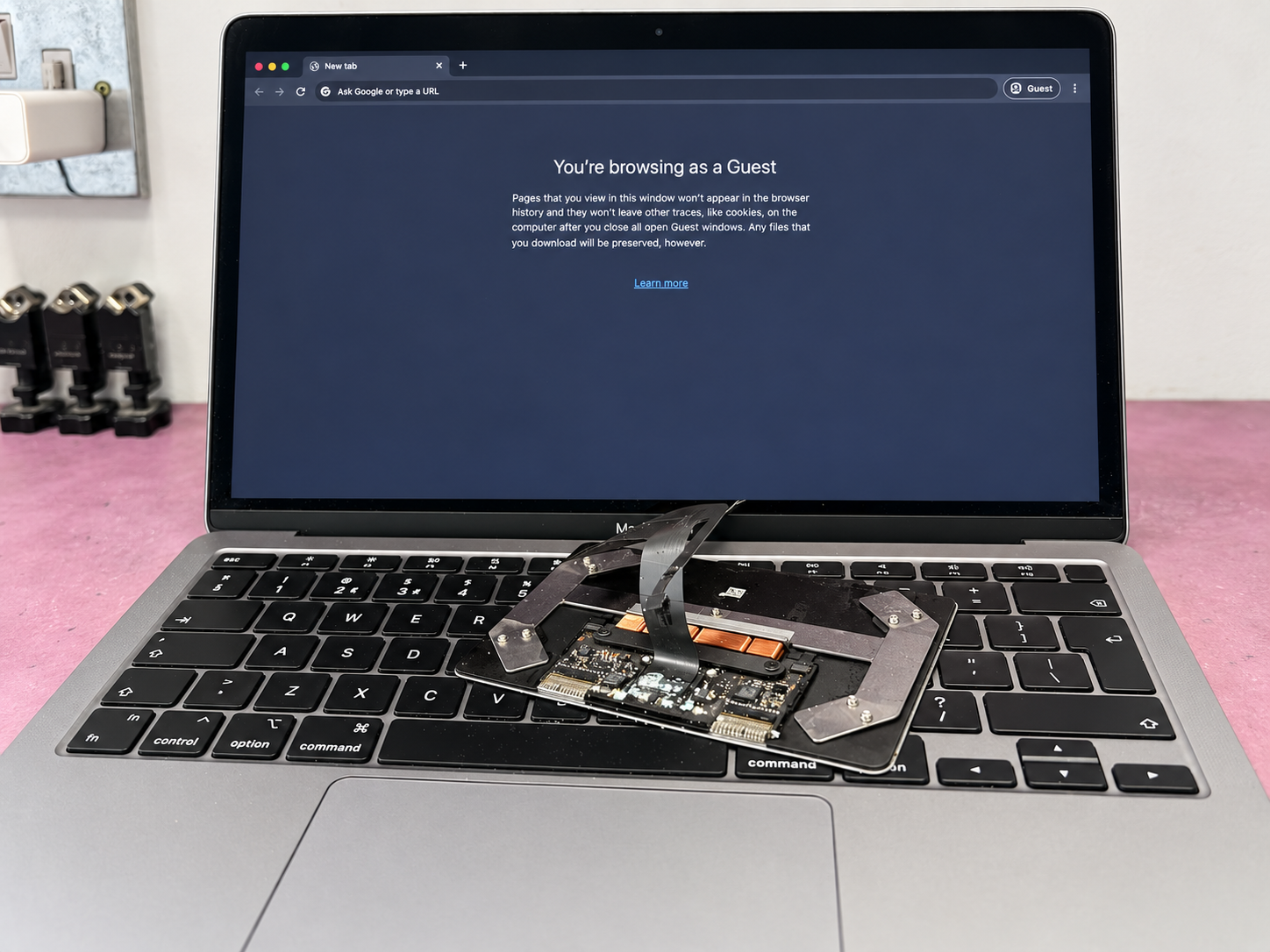
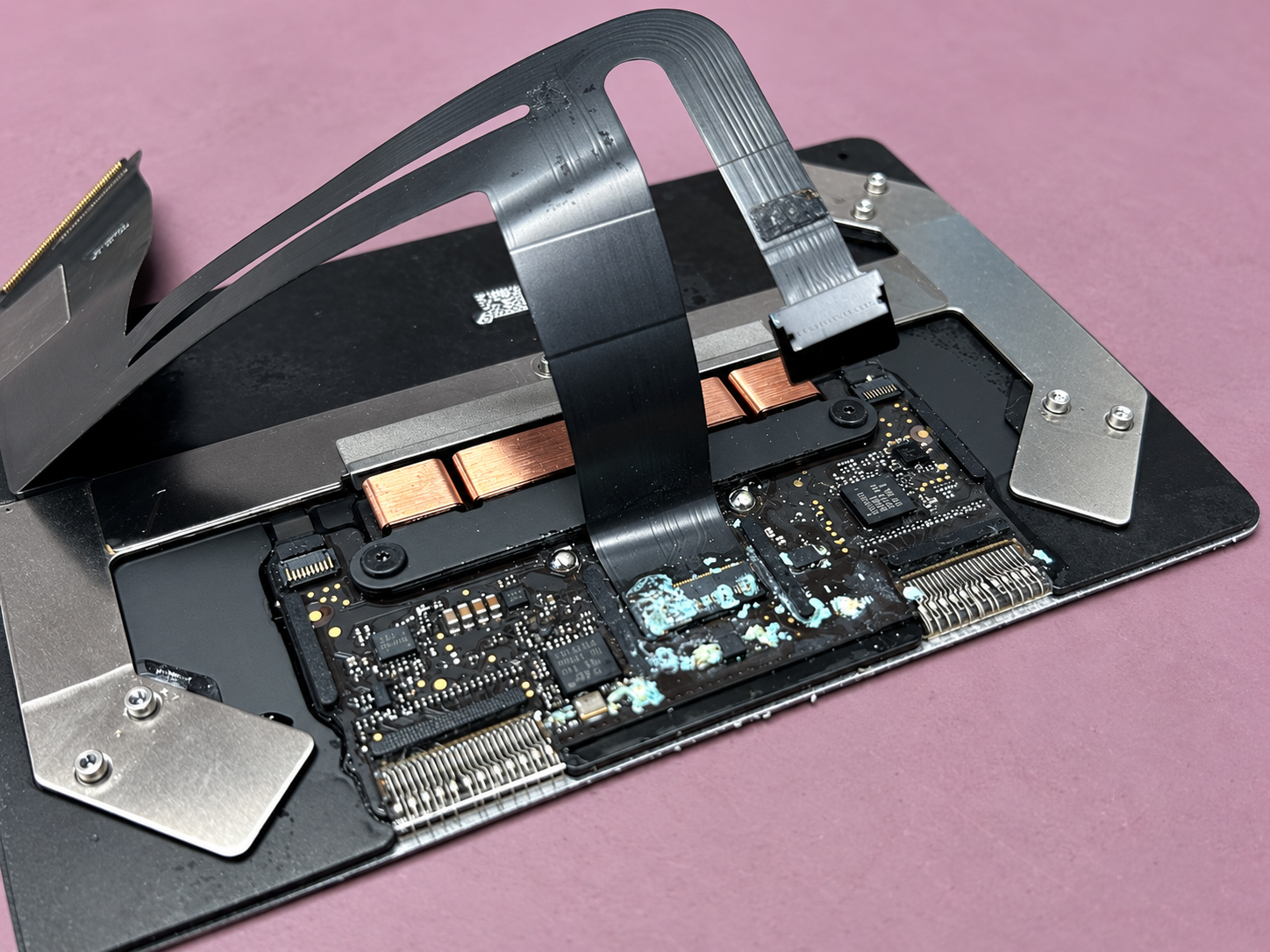
    We took the MacBook apart to inspect it and clean the affected areas. The workshop photographs show the removed trackpad assembly, with visible liquid-damage residue around its electronics.

    Liquid-damaged MacBook Air A2337 trackpad assembly removed at iPhoneBits in Glengormley
    The removed trackpad assembly, showing the affected electronics.

    The keyboard and trackpad symptoms gave us clear faults to investigate. We cleaned the MacBook and replaced the failed trackpad with a new genuine trackpad.

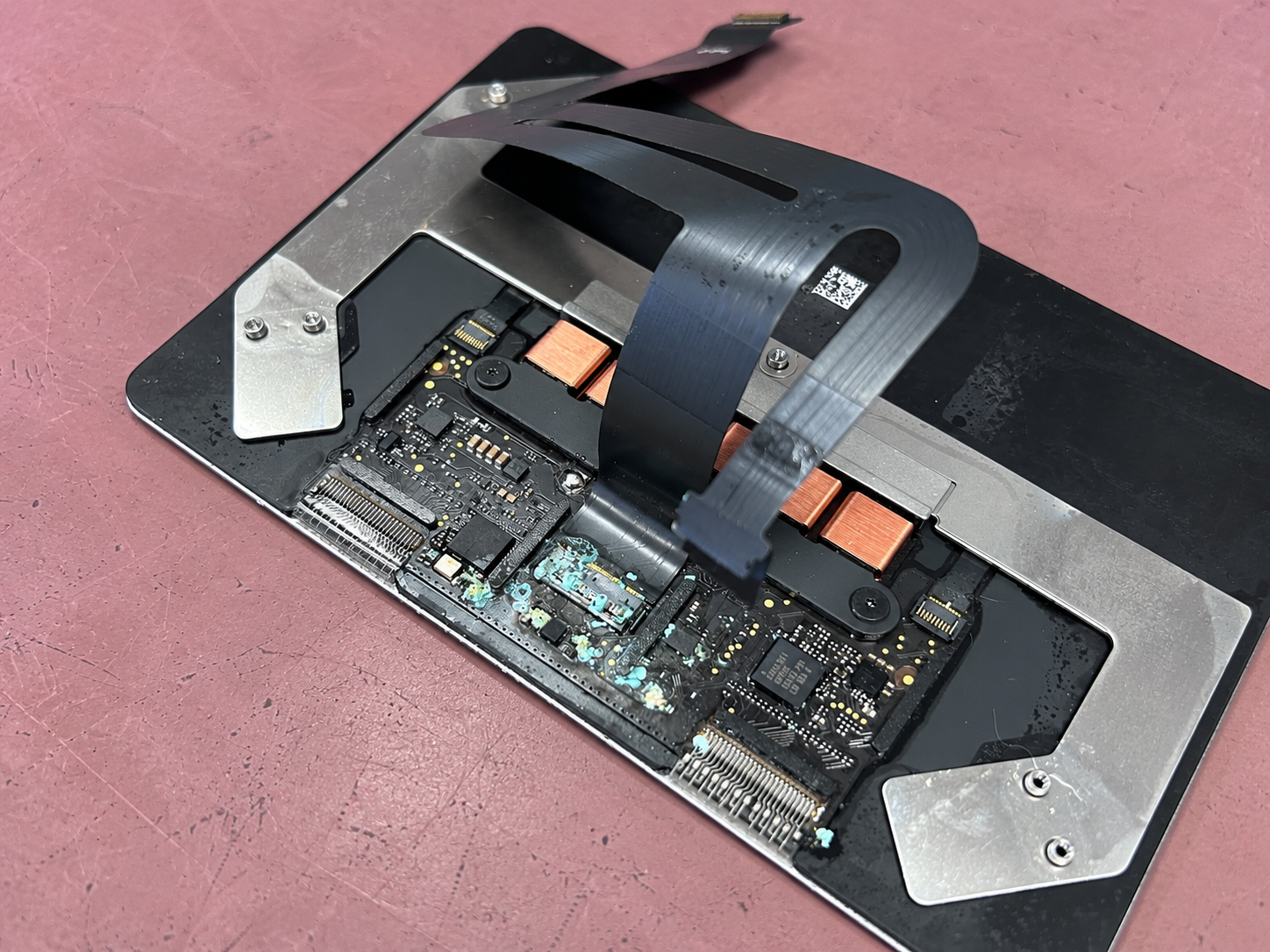
    Close-up of liquid-damage residue on the removed MacBook Air trackpad
    A second view of the damaged trackpad before replacement.

    Cleaning, a genuine trackpad and full diagnostics

    Once the cleaning and trackpad replacement were complete, we ran full diagnostics and tested the MacBook’s operation. The keyboard and trackpad were working again, and the MacBook was fully working and tested at the end of the repair.

    That final testing is an important part of the job. The original problem involved both input devices, so the finished repair needed to address the customer’s everyday use of the laptop as well as the damaged component.

    MacBook Air A2337 running again after liquid-damage cleaning and trackpad replacement
    The MacBook Air running again following the repair.

    When your coursework is on the computer

    For this customer, the MacBook was more than a piece of hardware: it held files they needed for their course. If your laptop contains important coursework or other files, let us know when you first contact us so we understand what matters to you.

    In this case, the repair outcome was a fully working, tested MacBook following cleaning and a genuine trackpad replacement. Each liquid-damaged laptop needs its own assessment before we can confirm the work required.

    MacBook liquid-damage repairs in Glengormley

    Has a spill or pet accident left your MacBook with a keyboard or trackpad fault? Tell iPhoneBits the model, what happened and which functions have stopped working. Our upstairs Glengormley workshop serves customers across Newtownabbey and the surrounding area.

    Read about our MacBook and laptop repair services, or see another recent MacBook liquid-damage repair from the workshop.

    iPhoneBits
    Upstairs at 350 Antrim Road, Glengormley, Newtownabbey, BT36 5EQ
    07731 446515 · Ask us on WhatsApp

  • MacBook Neo Water Damage Repair in Glengormley: Working Again in Two Days

    MacBook Neo Water Damage Repair in Glengormley: Working Again in Two Days

    A flashing folder. Important documents on the computer. A MacBook Neo that would not start normally after water damage.

    This was a recent MacBook water damage repair at iPhoneBits in Glengormley. The customer reported the flashing folder icon and told us that important documents were stored on the machine. We cleaned and treated the MacBook for liquid damage, ran full diagnostic tests and got it working again. The repair took two days.

    What the customer reported

    The MacBook had suffered water damage and was showing a flashing folder instead of starting normally. With documents on the device, the customer needed help understanding the repair options.

    A folder with a flashing question mark means the Mac cannot find an available startup disk containing a working operating system. It signals a startup problem, but does not identify the underlying cause by itself. Apple explains the flashing folder symbol here.

    In this case, the water-damage history was an important part of the assessment.

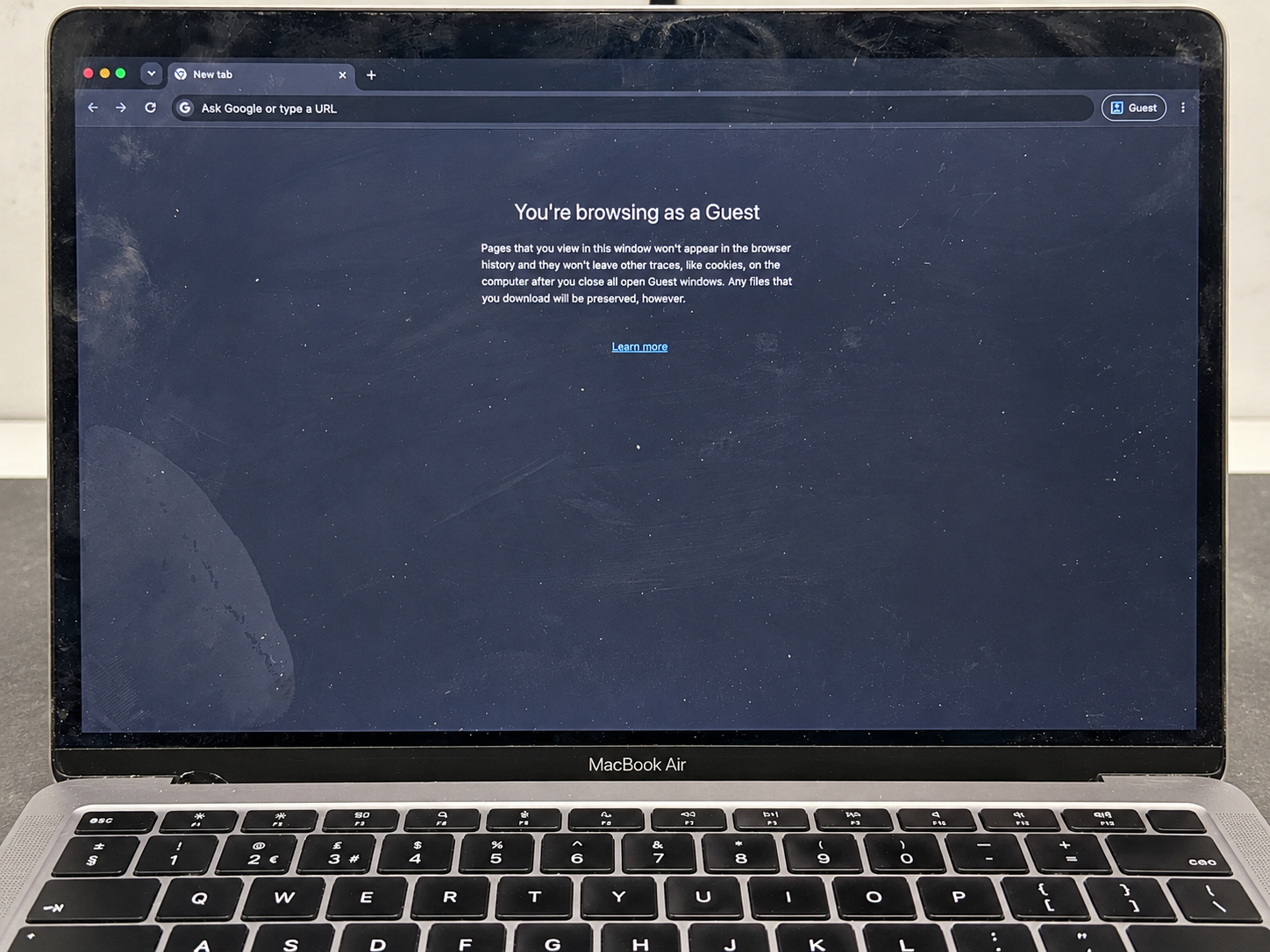
    MacBook Neo opened for liquid-damage inspection at the iPhoneBits Glengormley workshop
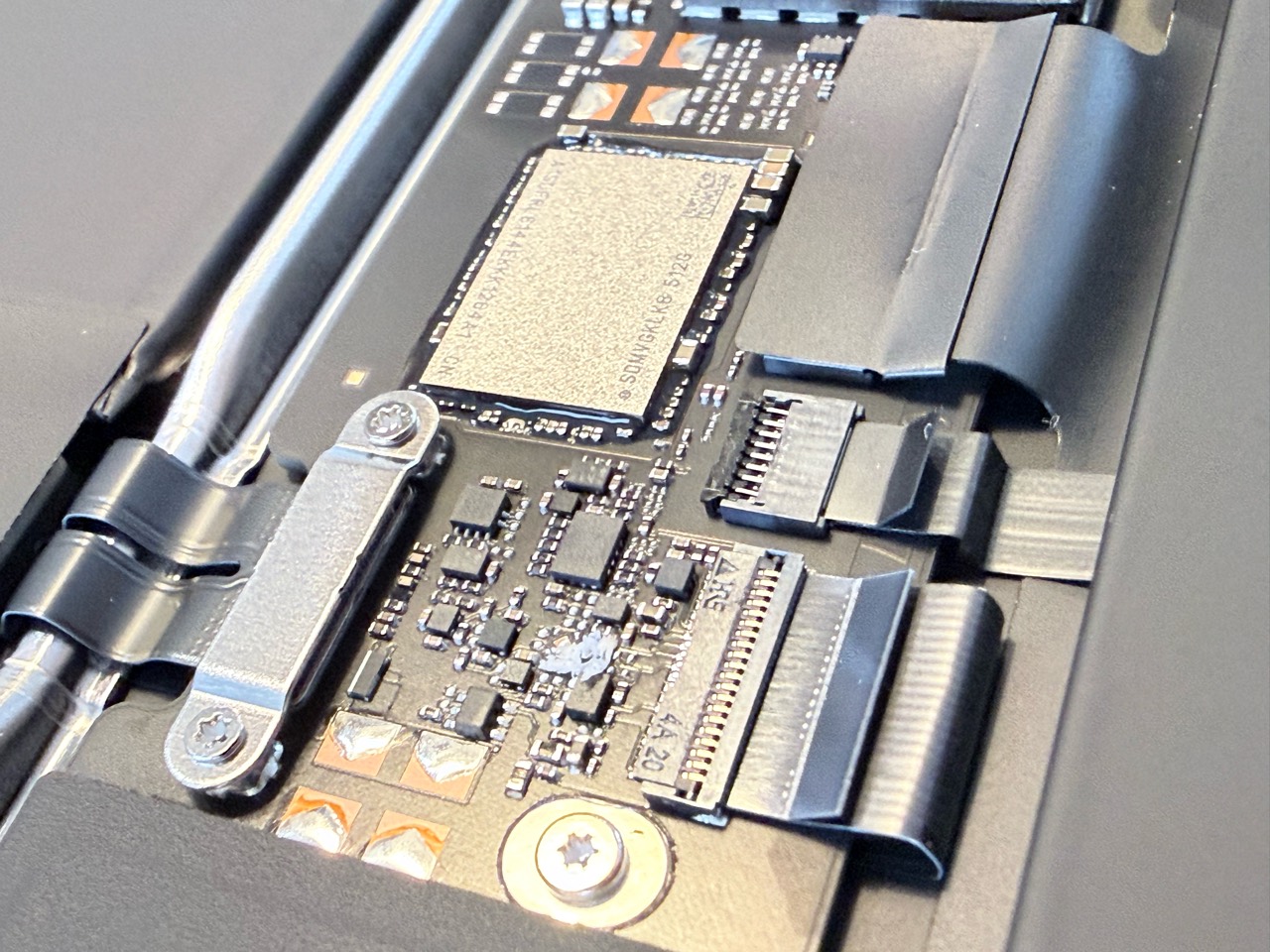
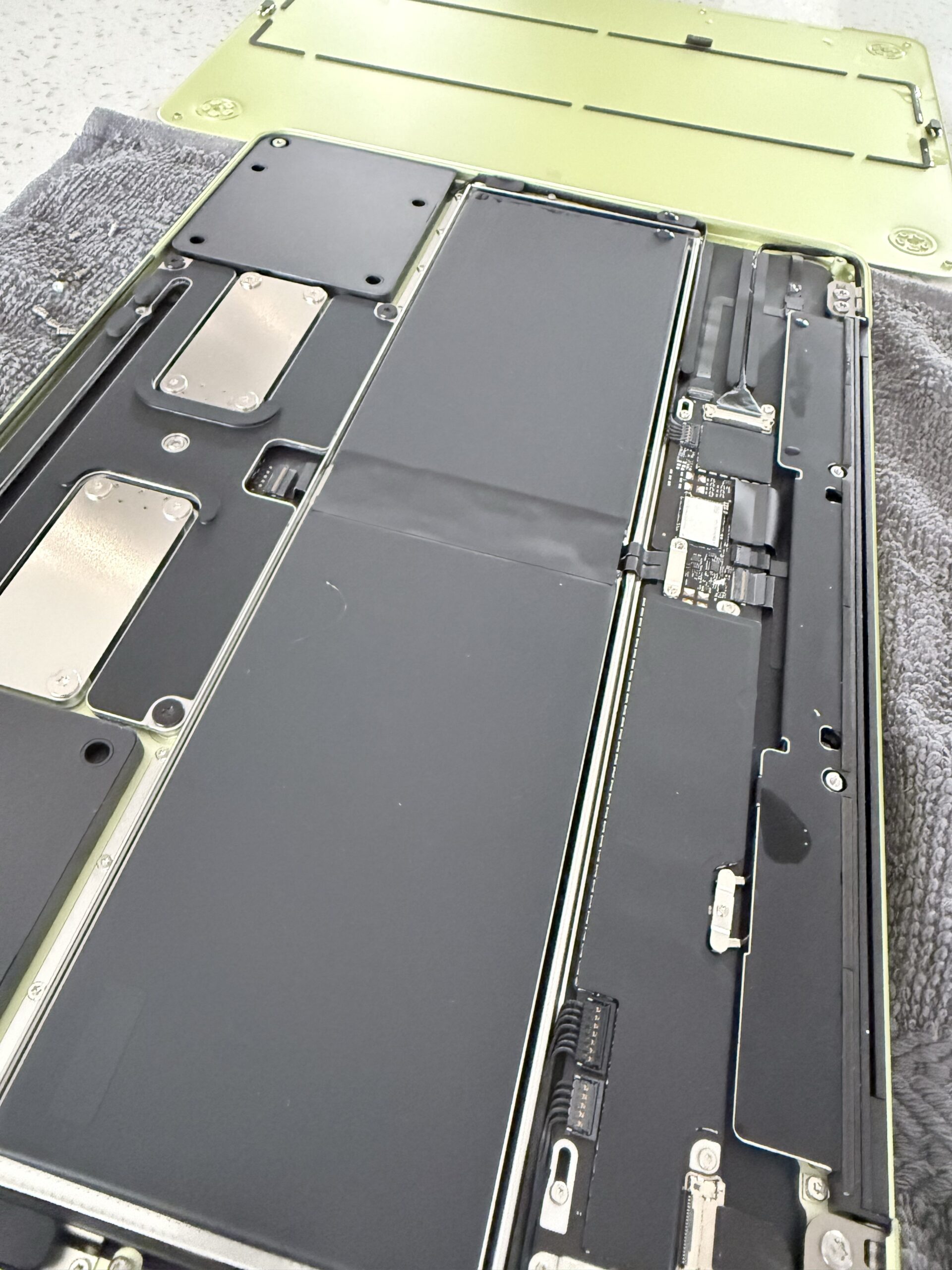
    The MacBook Neo opened for inspection at our Glengormley workshop.

    Liquid-damage cleaning and treatment

    We cleaned the MacBook and treated it for liquid damage, then ran full diagnostic tests to check its operation.

    The workshop photographs show the actual machine, including its board and connectors. They document this repair without relying on stock photographs or a recreated fault.

    Liquid-damage work depends on the condition of the individual device. Our board repair and data recovery service starts with assessment so we can explain the available options.

    Working again after two days

    After cleaning, liquid-damage treatment and full diagnostic testing, we had the MacBook Neo working again within two days.

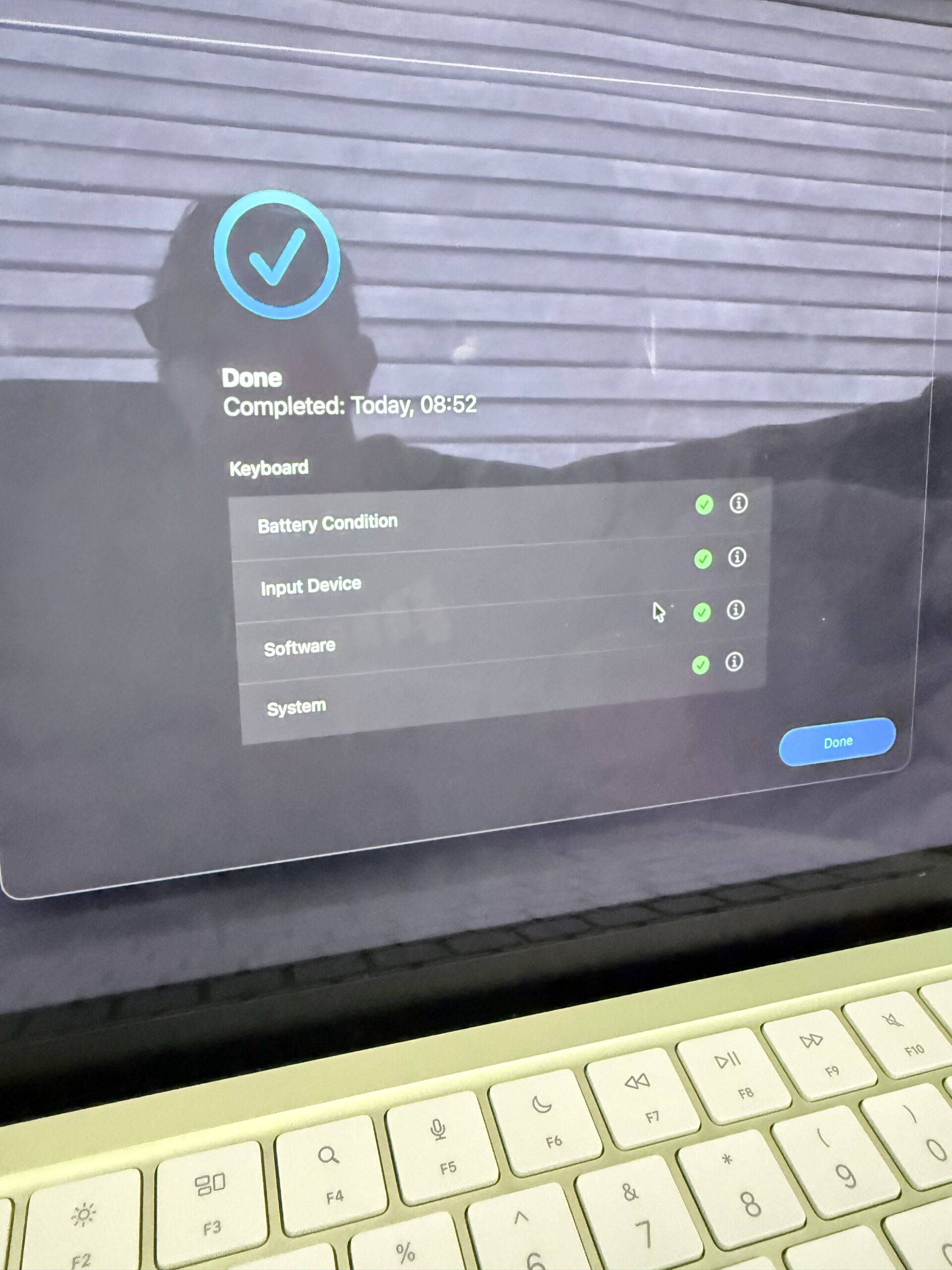
    Getting a computer to switch on is one stage of a repair. Checking its functions is another. The photographed keyboard diagnostic result shows green checks for the listed battery condition, input device, software and system categories. A separate workshop photograph also records completed Touch ID checks.

    Completed MacBook Neo keyboard diagnostic checks after liquid-damage treatment at iPhoneBits
    Completed keyboard diagnostic checks following liquid-damage treatment.

    The two-day turnaround applies to this particular repair. Other liquid-damaged MacBooks may need different work or more time for diagnosis, parts and testing. We confirm an expected timeframe after assessment.

    Important documents on a Mac that will not start?

    Tell us about those files when you first contact us. It helps us understand your priorities before discussing repair options.

    Avoid erasing or formatting the storage as a troubleshooting step if you need files that are not backed up. Explain any liquid exposure as well as the message or symbol appearing on screen. Returning a computer to working order and confirming the condition of particular files are separate checks.

    MacBook repairs in Glengormley and Newtownabbey

    If your MacBook has suffered a spill or will not start, contact iPhoneBits with the model and a description of what happened. Our Glengormley workshop serves customers across Newtownabbey and the surrounding area.

    Find out more about our MacBook and laptop repair services, or request a repair quote.

    iPhoneBits
    350 Antrim Road, Glengormley, Newtownabbey, BT36 5EQ
    07731 446515 · Book a repair

  • Laptop & MacBook Repairs and Upgrades in Glengormley, Newtownabbey

    Laptop & MacBook Repairs and Upgrades in Glengormley, Newtownabbey

    A slow laptop does not always need replacing. If you need laptop or MacBook repairs in Glengormley, iPhoneBits can assess the fault, explain the upgrade options and help you decide where your money will make the biggest difference.

    Our family-run workshop at 350 Antrim Road, Glengormley, Newtownabbey, BT36 5EQ helps home users, students and local businesses with Windows laptops, MacBook Air, MacBook Pro, iMac and desktop computers. From storage upgrades to charging faults, we check the machine before recommending work.

    Laptop upgrades: get more from the computer you already own

    Slow start-up, limited storage and sluggish multitasking can have different causes. An upgrade is useful when it addresses the actual bottleneck, so we start by checking the model, its condition and how you use it.

    • SSD upgrades: replacing a compatible mechanical hard drive with an SSD can improve start-up and loading times. We can also assess larger storage options when space is running out.
    • RAM upgrades: extra memory can help with multitasking on machines that support it. We check the memory type, available slots and model limits first.
    • Data transfer and cloning: where the original drive is readable and the setup allows it, we can help move files or clone storage during an upgrade.
    • Cooling and servicing: blocked cooling systems, fan faults and thermal issues can affect everyday performance. We assess the cause and recommend suitable servicing.
    • Windows and software support: boot problems, failed updates and software issues may need attention before buying new hardware. A fresh installation is an option where appropriate, with data requirements agreed first.

    MacBook and iMac upgrades: compatibility comes first

    Mac upgrade options depend on the exact model and year. Some older Macs have replaceable storage or memory; other models have integrated components that are not conventional upgrade parts. We assess your particular Mac before quoting for extra RAM or internal storage.

    Send us the model name and year, or bring the Mac into the workshop. We will explain whether an upgrade, a repair or a different approach makes sense for the tasks you need it to do. There is no one-size-fits-all MacBook upgrade package.

    MacBook and laptop repairs in Glengormley

    Our laptop, Mac and PC repair service covers everyday damage and more involved faults. We work on a wide range of Dell, HP, Lenovo, Asus, Acer and Microsoft Surface devices, alongside Apple computers, subject to model and parts availability.

    • Screen and hinge problems: cracked displays, damaged hinges, display cables and backlight faults.
    • Battery and charging faults: poor battery performance, damaged DC sockets, USB-C charging issues and no-power diagnosis.
    • Keyboard, trackpad and fan problems: assessment and repair options for the parts you depend on every day.
    • Liquid damage and logic-board faults: careful inspection and testing to establish what can be repaired.
    • Storage faults and important files: assessment of failed drives, file transfer and recovery options.

    For a computer that will not switch on or files trapped on a damaged device, see our board repair and data recovery service. Tell us if recovering the data is your main priority.

    How long do laptop upgrades and MacBook repairs take?

    We confirm a realistic timeframe after assessment. Turnaround depends on the fault, the exact model, parts availability and the testing required. Contact us before travelling if you need your computer back for a particular date.

    • SSD or RAM upgrades: timing depends on compatibility, stock, installation and whether files need transferring.
    • Screen, battery and charging repairs: the correct replacement part must be identified and available before we can confirm completion.
    • Liquid damage, intermittent faults and board repairs: diagnosis and follow-up testing can take longer because the fault may involve more than one component.
    • Data recovery or large transfers: drive condition and the amount of data affect the time needed.

    We aim for a fast turnaround and will explain the expected timescale for your job. If you rely on your laptop for work or study, mention your deadline when requesting a quote so we can advise on the options.

    What happens when you bring your computer to iPhoneBits?

    1. Tell us the problem. Share the exact model, symptoms, any previous damage and whether important files need protecting.
    2. We assess the device. We check the likely fault or performance limitation and confirm suitable parts and options.
    3. You receive a quote. We explain the proposed work and timeframe before proceeding.
    4. Repair, upgrade and testing. We check the completed work and explain any relevant warranty cover. Cover depends on the part and repair, with up to a one-year warranty available.

    Frequently asked questions

    Is it worth upgrading an older laptop?

    It can be, particularly if storage or memory is holding back an otherwise suitable machine. We also consider the device’s condition, software compatibility and your needs before recommending an upgrade.

    Can every MacBook have more RAM or a larger SSD fitted?

    No. Upgrade options vary by model. We need to identify your MacBook before confirming whether its internal memory or storage can be upgraded.

    Will my files be kept during an upgrade?

    Transfer or cloning may be possible, but it depends on drive health and the work involved. Back up important files before bringing the device in where possible, and tell us about anything you cannot afford to lose. Ask us for advice if the computer will not start.

    Do you help customers across Newtownabbey?

    Yes. Our Glengormley workshop welcomes customers from Newtownabbey, Mallusk, Belfast and the surrounding area. Visit our contact page for location details or speak to the team before your visit.

    Book your laptop or Mac assessment

    For MacBook repairs, laptop repairs and computer upgrades in Glengormley and Newtownabbey, contact iPhoneBits with your model and a brief description of the problem.

    Get a repair or upgrade quote · Book your computer in · Call 07731 446515

    iPhoneBits
    350 Antrim Road, Glengormley, Newtownabbey, BT36 5EQ